
Quick answer
There is something quietly satisfying about filling in numbered squares and watching a hidden image emerge from what looked like an abstract grid. That experience — the slow reveal, the meditative repetition, the final moment of recognition — is exactly what monochrome color by number delivers.
Unlike traditional coloring books where the outlines are obvious from the start, monochrome color by number keeps the subject hidden until the very last stroke. The entire image uses a single color in multiple shades, creating a puzzle-like quality that blends the relaxation of coloring with the reward of a mystery solved.
People use it as a relaxing activity, as a classroom reward, and as a puzzle. This guide explains what the format is and how it works: the definition, how an image becomes a grid of marks, how the reveal stays hidden, the three patterns, and which photos suit it. If you want to make one, the monochrome color by number tool does the conversion in your browser.
What Is Monochrome Color by Number?
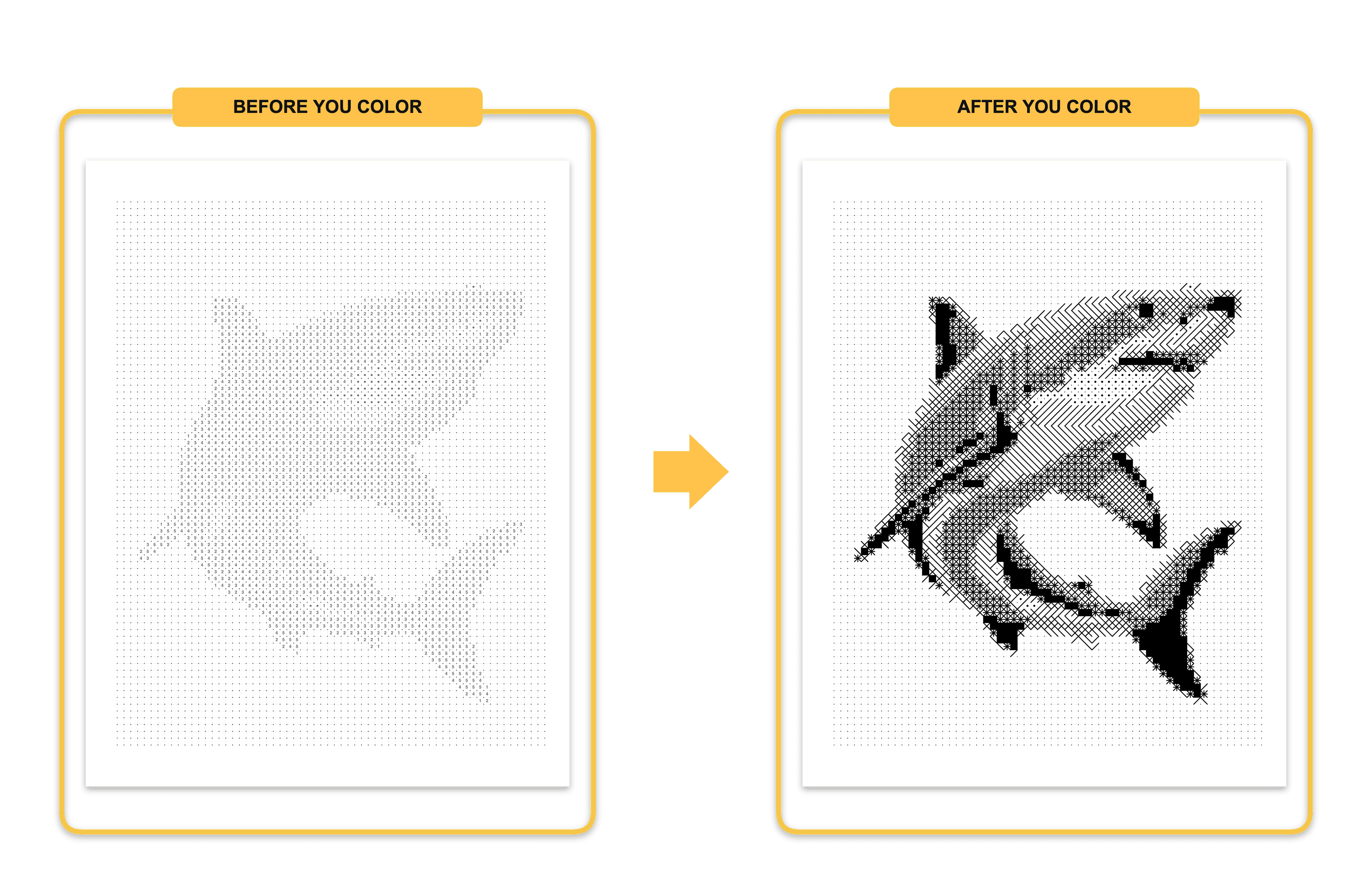
Definition
Monochrome color by number is one variation of the broader color by number format. If you are new to color by number in general, start with that guide for the full picture before diving into the monochrome-specific details below.
Monochrome color by number is a type of printable puzzle artwork where an image is divided into a grid of cells — squares, hexagons, or dots — and each cell is assigned a number corresponding to a specific shade of a single color.
The word monochrome comes from the Greek mono (one) and chroma (color). In this context, it means the entire artwork uses tonal variations of one base hue — for example, ten shades of blue ranging from near-white to deep navy — rather than a full color palette.
The person coloring fills in each numbered cell with the corresponding shade. As the cells fill in, an image gradually appears. The subject is typically invisible until the work is near completion, which creates the reveal experience that makes this format distinctive.
A Brief History
Color by number as a concept dates to the 1950s, when Dan Robbins, working for the Palmer Paint Company, developed numbered painting kits inspired by Leonardo da Vinci's practice of giving students numbered sections of canvas to fill in. The commercial kits sold over twelve million units in 1954 alone.
The format declined in the 1960s as it became associated with artistically "cheating," then returned in waves as a relaxation activity for adults in the 1990s and 2000s. The emergence of printable PDFs, print-on-demand publishing, and digital photo processing tools has driven the most recent evolution.
Monochrome specifically became commercially prominent around 2018–2020, when KDP publishers noticed that single-color books were cheaper to produce, easier to print at home, and delivered a distinctive aesthetic that full-color versions could not replicate.
How the Format Has Evolved
- 1950s–60s: Pre-printed paint kits, full color, mass market
- 1980s–90s: Pixel art and cross-stitch patterns introduced grid-based monochrome logic
- 2000s: Digital clip art coloring pages, early PDF publishers
- 2010s: Adult coloring book boom drove demand for intricate printable art
- 2018–present: AI-assisted photo-to-grid conversion makes custom monochrome color by number accessible to non-artists
- 2024–2026: Mystery mosaic, dot patterns, and hexagonal grids emerge as commercial sub-formats
How It Works
A source photograph or illustration is processed to extract tonal information. The image is divided into a regular grid of cells. Each cell is analyzed for its average brightness within the chosen color channel. The brightness value maps to a numbered shade from the palette — shade 1 being lightest, shade 10 (or however many steps are defined) being darkest.
The result is a numbered grid that looks abstract when blank, but reconstructs the original image when the correct shades fill every cell.
How It Differs from Related Formats
| Format | Color Range | Image Visible Before Coloring? | Grid Structure | Difficulty |
|---|---|---|---|---|
| Traditional Coloring Book | Full color | Yes — outlines shown | No grid | Easy |
| Paint by Numbers | Full color | Partial — numbered regions visible | Irregular regions | Moderate |
| Mystery Mosaic | One color | No — hidden until complete | Regular grid | Moderate–Hard |
| Standard Color by Number | Full color | No | Regular grid | Moderate |
| Monochrome Color by Number | One color, multiple shades | No | Regular grid | Moderate |
Traditional coloring books show the subject clearly through outlines. The coloring experience is expressive rather than puzzle-based.
Paint by numbers uses a full color palette mapped to irregular, organic regions. The regions are visible as outlines, so the subject is partially recognizable before coloring begins.
Mystery mosaic is often used interchangeably with monochrome color by number, though some publishers use the term specifically for versions where the image is intentionally obscured by a non-square grid. Hexagonal cells are particularly effective at hiding the source image.
Standard color by number uses a full palette across a grid. The presence of multiple colors makes it easier to guess the subject early and removes the monochrome aesthetic.
Key Takeaways
- Monochrome color by number uses one color in multiple tonal shades
- The subject is hidden until the coloring is nearly complete
- It combines the meditative quality of coloring with the satisfaction of a puzzle reveal
- It differs meaningfully from traditional coloring books, paint by numbers, and mystery mosaics — though the terms are sometimes used loosely
Common Misconceptions
"Monochrome means black and white." Monochrome means one color. A monochrome color by number can use any single hue — blue, sepia, green, or any other — rendered in shades from light to dark.
"It is just a simplified coloring page." The grid structure, hidden image mechanics, and tonal precision make it significantly more structured than a standard coloring page.
"You need artistic skill to complete it." The numbers remove the need for color judgment. Any person who can distinguish written numbers and stay within cell boundaries can complete a monochrome color by number.
Why People Like the Format
The Relaxation Effect
The repetitive, structured nature of filling in cells is cognitively similar to the focused-attention practices used in mindfulness exercises. Monochrome color by number adds a layer of constraint — working within a single-color palette — that some practitioners find reduces decision fatigue compared to full-color versions. There are no choices about which color to use. The numbers decide. The person simply executes, and that simplicity is part of the appeal.
The Puzzle Experience
The hidden image reveal is a fundamentally different psychological experience than coloring an image whose subject is already visible. The progression from abstract grid to recognizable image creates small moments of pattern recognition that maintain engagement throughout the activity.
This reveal quality makes monochrome color by number more replayable than traditional coloring pages. The same grid given to a new person provides the same experience of discovery.
Educational Value
Teachers have found specific pedagogical uses for the format:
- Number recognition and matching: Young learners practice identifying numbers and matching them to labels
- Fine motor development: Coloring within small cells develops pencil control
- Concentration practice: Completing a large grid requires sustained attention
- Reward activity: The reveal at the end provides a clear, visible payoff for sustained effort
The single-color requirement also introduces informal color theory — children naturally observe how the same hue can appear lighter or darker, and how tonal variation creates the illusion of depth and form.
How Does It Work? (Step-by-Step)
Creating a monochrome color by number involves a clear sequence of transformation steps. Understanding this sequence helps you choose better source photos, set realistic expectations, and troubleshoot results.
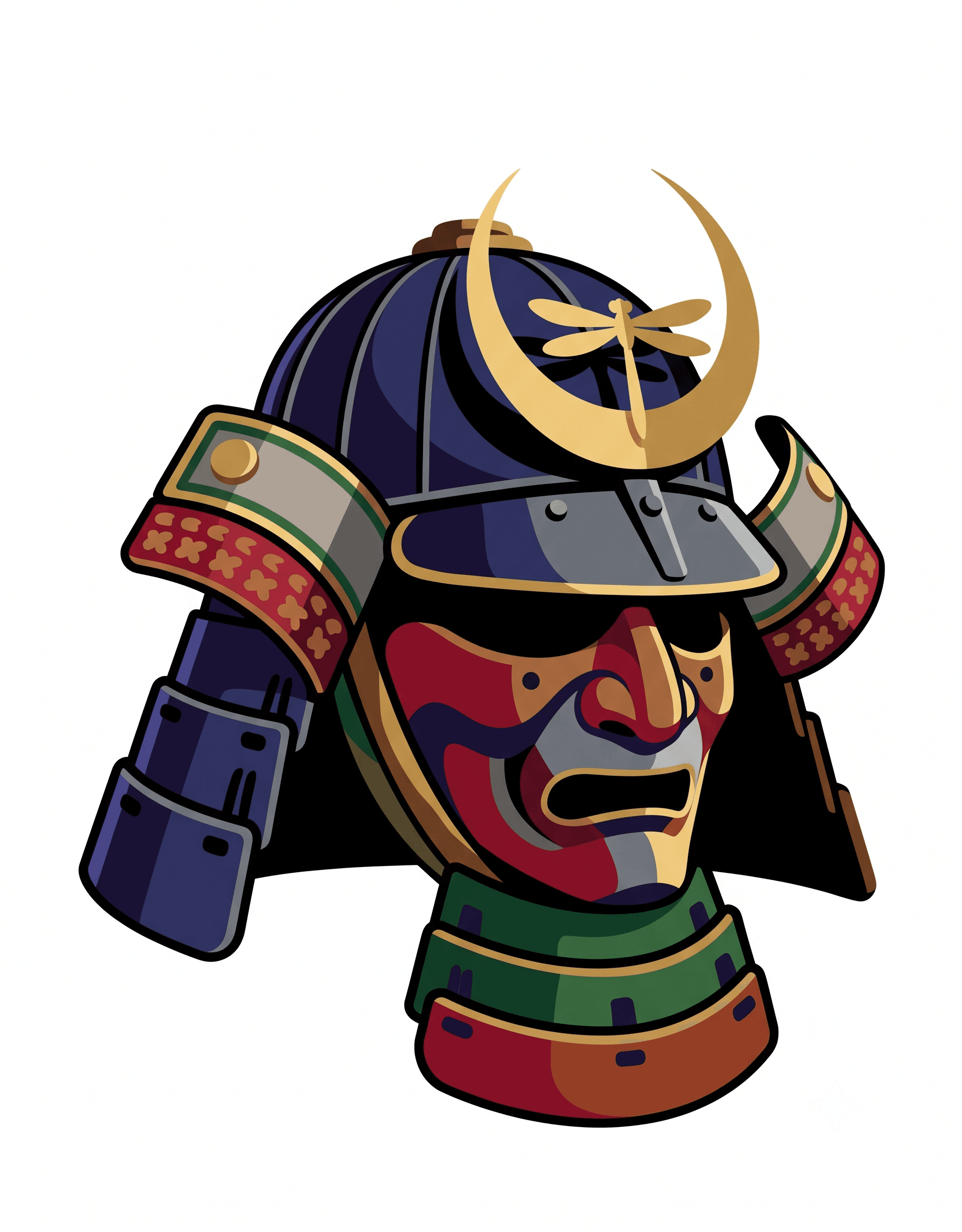
Step 1: Original Image
Everything begins with a source photograph or digital illustration. The quality, composition, and contrast of this image determine the quality of the final puzzle.
The source image is analyzed for tonal variation — the distribution of light and dark across the frame. Regions with strong tonal contrast will produce clear, recognizable cell patterns. Flat, low-contrast images will produce muddy grids where the subject is difficult to identify even after coloring.
The image is converted to grayscale at this stage, because the monochrome output depends only on tonal values, not the original color information. A vibrant red flower and a gray stone wall might produce identical tonal maps if they share the same brightness distribution.
What makes a good source image: Strong contrast between subject and background, clear focal subject, minimal clutter, good lighting, and sufficient resolution. The section on best photos covers this in detail.
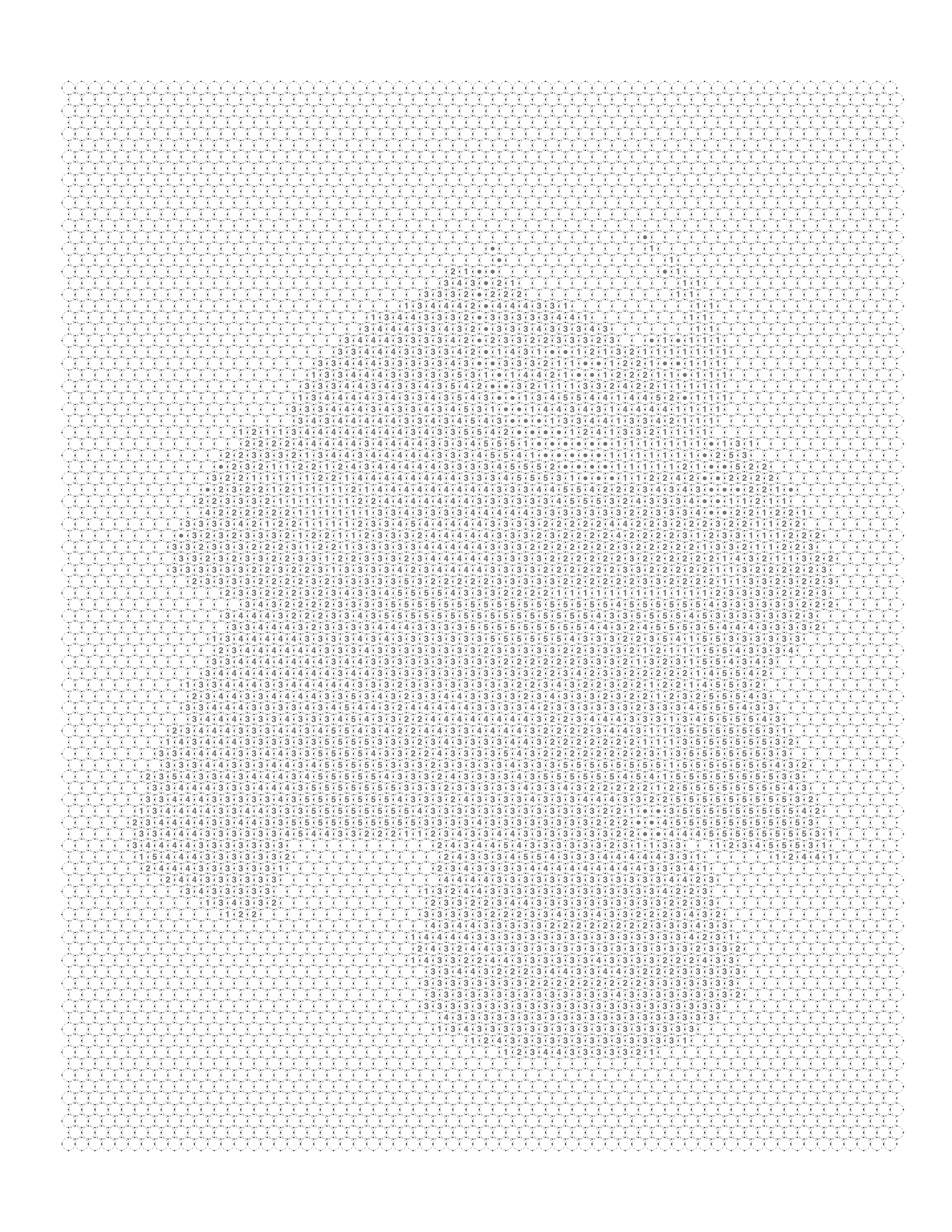
Step 2: Grid Division and Outline Generation
The grayscale image is divided into a regular grid of cells. The grid pattern determines the visual style of the puzzle:
- Square grid: Clean, geometric, pixel-art aesthetic
- Hexagonal grid: Organic, honeycomb appearance, better at obscuring the source image
- Dot grid: Circular cells, softer appearance, more decorative
Each cell is assigned an average tonal value based on the pixel data it contains. Similar tonal values are grouped into shades — typically 6 to 12 distinct levels — and each shade is assigned a number.
The outline shows all the cells, their boundaries, and their assigned numbers. At this stage, the grid looks like an abstract numbered pattern with no obvious subject.
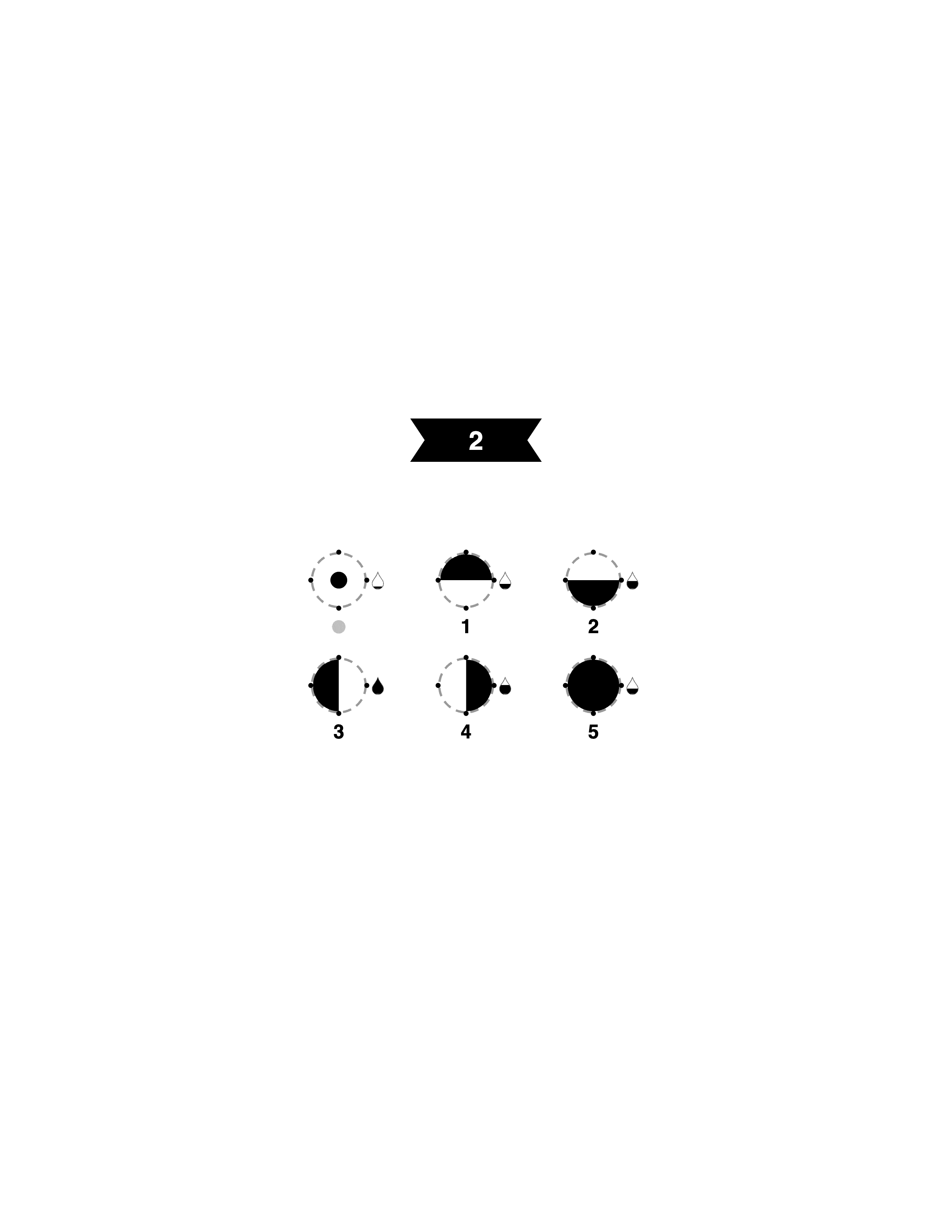
Step 3: Color Palette Definition
The palette defines exactly which physical color corresponds to each number. For a monochrome blue palette with ten shades, this might range from a very pale ice blue at number 1 to a deep midnight blue at number 10.
The palette is shown on the printable page alongside a legend — a small swatch of each color labeled with its number. This legend is the key the colorist uses to select the correct pencil, marker, or paint for each cell.
Palette design significantly affects the final visual quality. A well-designed palette distributes tonal steps evenly across the range. Poorly designed palettes — with steps clustered at one end of the range — produce flat, low-contrast results.
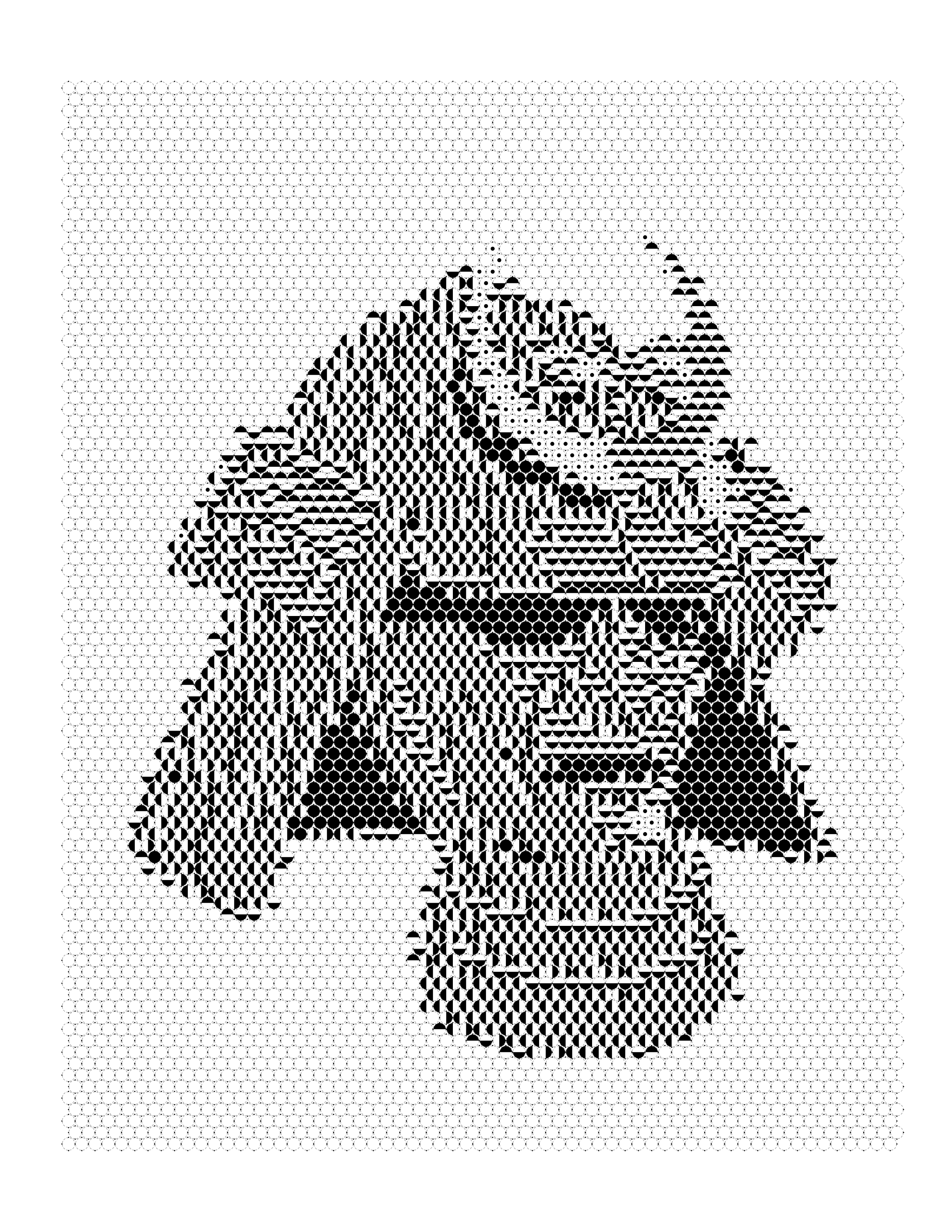
Step 4: Colored Reference Version
The colored version shows what the completed puzzle should look like. This serves two purposes:
- Quality reference: The creator can verify that the palette and grid accurately reconstruct the source image before publishing or printing
- User preview: Some publishers include this as a reference page or answer key in the book; others deliberately omit it to preserve the mystery
Comparing the colored version to the original photograph reveals where the cell size, shade count, and palette choices have succeeded or failed. The colored version is the diagnostic tool — use it before generating the final PDF.
Step 5: Printable PDF
The final deliverable is a print-ready PDF containing:
- The numbered grid (the puzzle page)
- The color palette legend
- Optionally: the colored reference image
- Optionally: usage instructions or tips
The PDF is formatted for standard page sizes — typically A4 or US Letter — with appropriate margins for printing and binding. For KDP publishing, the PDF must meet specific interior dimension and bleed requirements. For home printing, a standard Letter or A4 PDF works on any home printer.
What the Marks Actually Are, and How Tones Become Them
The step above describes the pipeline. It is worth being concrete about the one part that is unique to monochrome, because it is the part most guides leave vague: what is actually printed inside a cell.
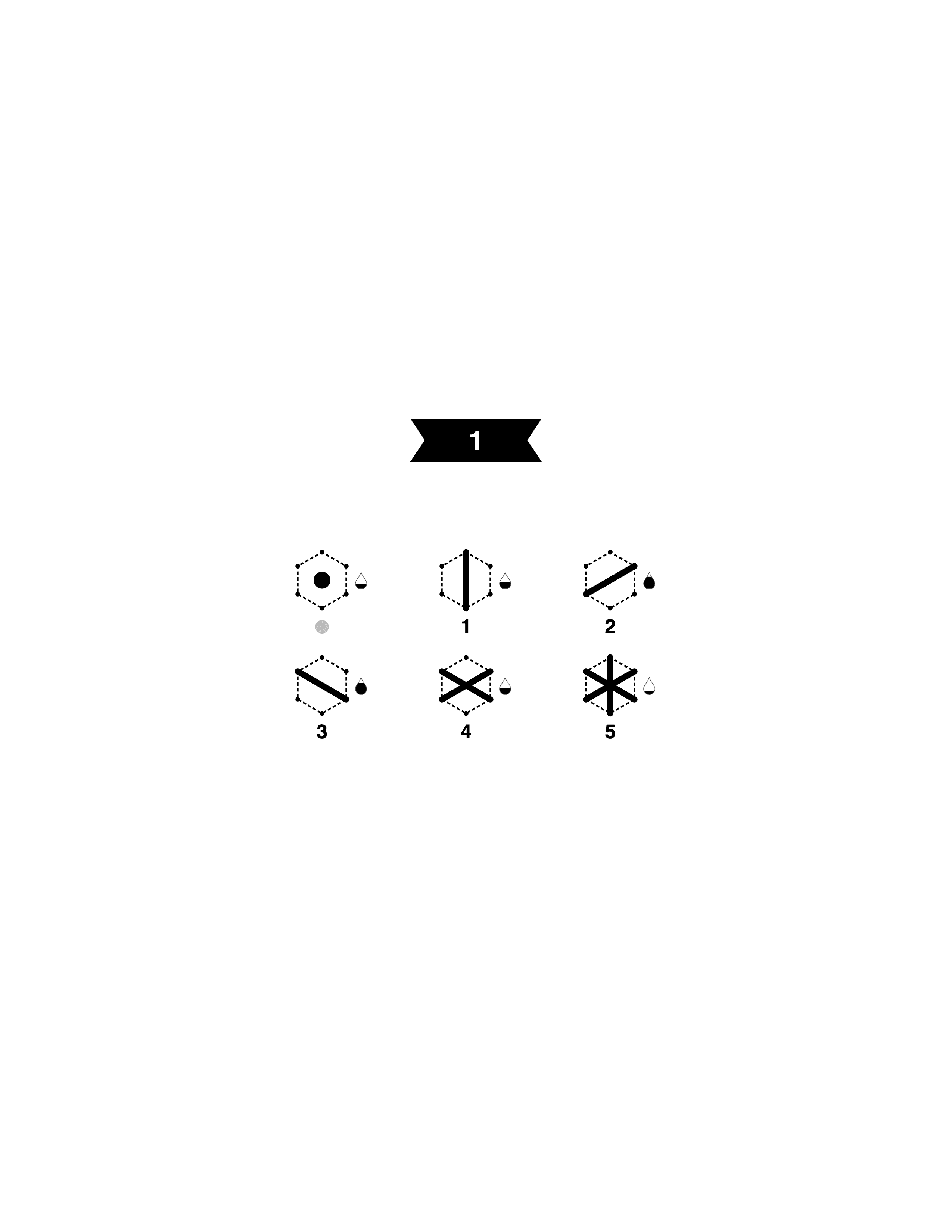
On a monochrome page a cell does not hold a number. It holds a mark — a small drawn figure that tells you how dark to shade that cell. Each pattern prints a fixed set of them, running from a single dot at the lightest end to a solid fill at the darkest.
What the Marks Actually Are
Each pattern prints a fixed set of marks, lightest on the left. How many there are is decided by the pattern you choose — it is not a separate setting — and some neighbouring marks carry the same amount of ink, so the mark has to be read rather than eyeballed.
Two things follow from this that surprise most people the first time.
The number of shades is not a setting you choose. It comes with the pattern. Square and dot print six marks; hexagon prints seven, which is the most of any pattern and the reason it holds a gradient better than the other two. If you want a longer tonal ramp, you change pattern — there is no separate shade-count control to turn up.
Some neighbouring marks carry the same weight of ink. On the square pattern the two single diagonals are equally dark and differ only in direction. On the dot pattern four of the six marks are half-circles, identical in coverage and distinguished only by which half is filled. This is why a colorist has to read the mark rather than judge its darkness at a glance, and why crowding too many cells onto a page is more punishing here than on a numbered one. The guide to symbol coloring pages has a repeatable audit for finding which marks in a set will be mistaken for each other.
Tone in, mark out
Nothing about color reaches the page. Each cell is averaged to a single brightness, that brightness is banded into one of the pattern's levels, and the level prints as its mark.
How a Photograph's Tones Become Marks
Every cell is averaged to one brightness, that brightness is banded into one of the pattern's levels, and the level prints as its mark. Color never enters it — only how light or dark the cell was.
A useful consequence: whether a photo will work is entirely a question of its tones. Its colors are irrelevant, and a vivid photograph with poor tonal separation will convert worse than a dull one with good separation. What makes a good photo for color-by-number conversion covers source selection generally; for a monochrome page, read every criterion there as a statement about brightness.
Keeping the Reveal Hidden
Most monochrome pages are sold as hidden-image puzzles — mystery mosaics, in the language of the shelf — and the reveal is the product. It is also the easiest thing to break, and it breaks at the coding stage rather than the printing one.
A page gives itself away when the marks stop changing at the subject's edge. If every cell of the subject carries one mark and every cell of the background carries another, the boundary between the two mark fields draws the outline in plain sight, and there is nothing left to discover.
Why a Flat Subject Gives Itself Away
Coded by region
Coded by tone
Both pages hide the same sphere. The difference is whether the marks change across the subject or stop dead at its edge.
Tonal conversion mostly protects you from this by construction, because a lit subject is not one brightness — it runs from highlight through mid-tone to shadow, and the marks change with it. The failures happen when the subject genuinely is flat:
- A subject shot against a plain backdrop in even light. Cut-out product shots and flat graphics are the usual offenders. Side lighting, or any lighting that puts a gradient across the subject, fixes it.
- A silhouette. A dark subject against a light background is two tones and nothing else, however good the photograph is.
- A grid so coarse that each cell swallows a whole tonal region. Fine tonal variation cannot survive into marks if there are only a few hundred cells to hold it.
The last one is worth dwelling on, because it is a genuine tension rather than a mistake: coarse grids are easier to color and worse at hiding, and the band where both work is narrower than people expect. Choosing a grid size for a mystery mosaic works out the arithmetic in millimeters, and what mystery coloring is covers the hidden-image format on its own terms.
Pattern Guide: Square, Hexagon, and Dot
The pattern — square, hexagon, or dot — is one of the most consequential decisions in creating a monochrome color by number. Each pattern has distinct visual qualities, practical advantages and disadvantages, and an audience it serves particularly well.
Square Pattern
Overview
The square grid is the most familiar pattern in color by number publishing. Cells are rectangular, arranged in a regular row-and-column matrix. The result has a pixel-art aesthetic — clean, geometric, and immediately recognizable to anyone familiar with digital imagery.
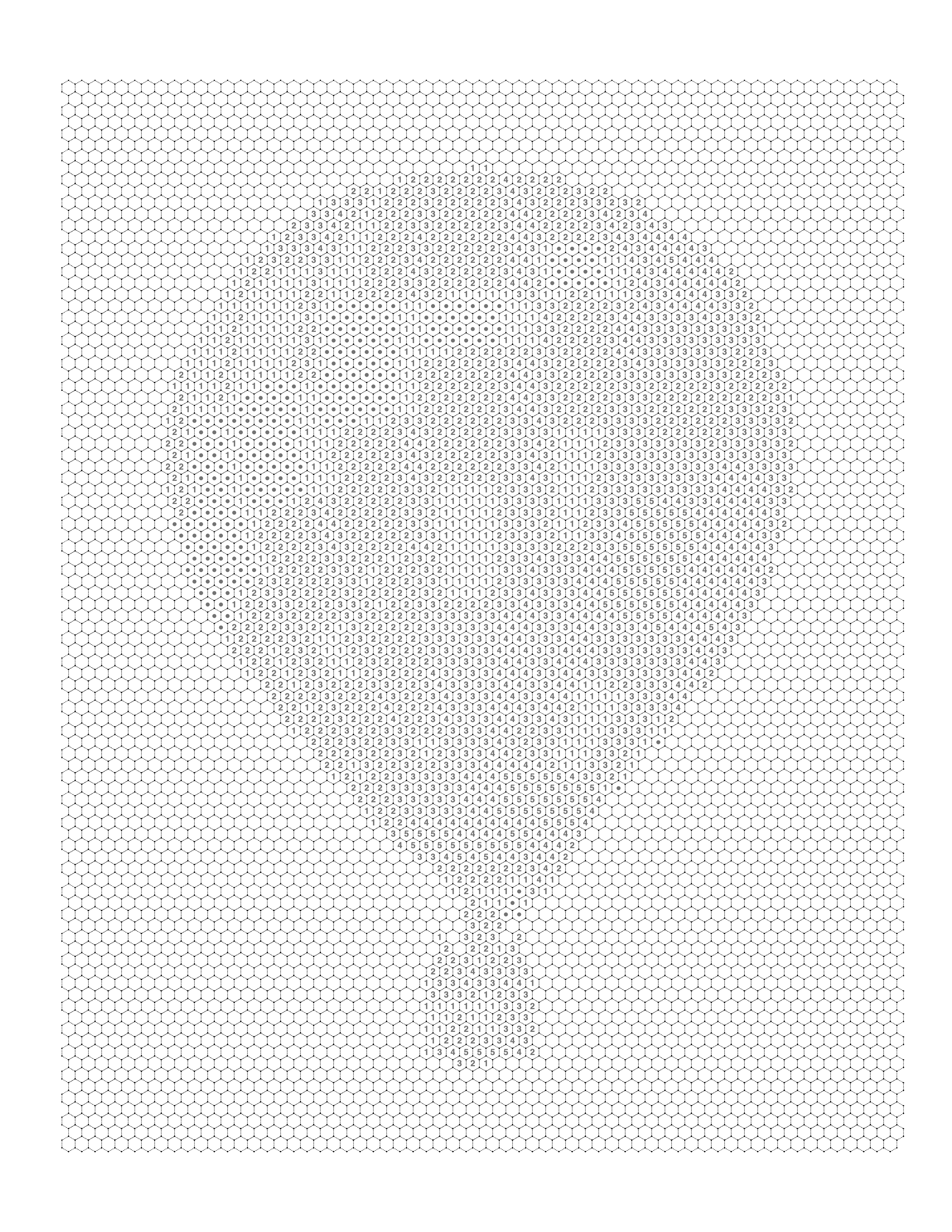
Best Use Cases
- Portraits and faces where grid alignment aids feature reconstruction
- Architectural subjects with strong horizontal and vertical lines
- Simple nature subjects — single flowers, birds, pets — with clean backgrounds
- Educational worksheets for younger students who benefit from large, easy-to-fill cells
- KDP publications targeting adults who prefer a crisp, modern aesthetic
Advantages
- Highest image fidelity of all three patterns at equivalent cell count
- Easiest to print cleanly — straight lines require no special print quality
- Easiest to color — cells are large and unambiguous
- Most familiar format — lowest learning curve for new users
- Best for portrait photography where facial features need accurate reconstruction
Disadvantages
- The pixel aesthetic can feel rigid compared to organic subjects
- The subject is often partially recognizable early in the coloring process, which reduces the mystery element
- Less visually interesting as decorative art compared to hexagonal patterns
Printing Quality
Excellent. Square grids print cleanly at standard 300 DPI on any laser or inkjet printer. Cell boundaries are crisp straight lines that reproduce accurately even on budget home printers.
Typical Audience
- Beginners to color by number
- Children and educators using large-cell versions
- KDP publishers prioritizing image accuracy over visual novelty
- Portrait photographers creating custom art from personal photos
Common Mistakes
- Too fine a grid for the subject: A highly detailed landscape at very small cell size produces an overwhelming number of tiny cells that are frustrating to color
- Poor source image contrast: Square grids are unforgiving with flat images — the subject may not reconstruct clearly
- Ignoring margins: Square grid PDFs with insufficient page margins clip cells at the edges, creating partial cells that cannot be colored correctly
Professional Recommendation
Use square patterns when image accuracy is the priority. For portraits — especially pet portraits — the square grid reliably reconstructs the subject. For decorative or gift-oriented products where the aesthetic of the grid itself matters, consider hexagonal patterns instead.
Hexagon Pattern
Overview
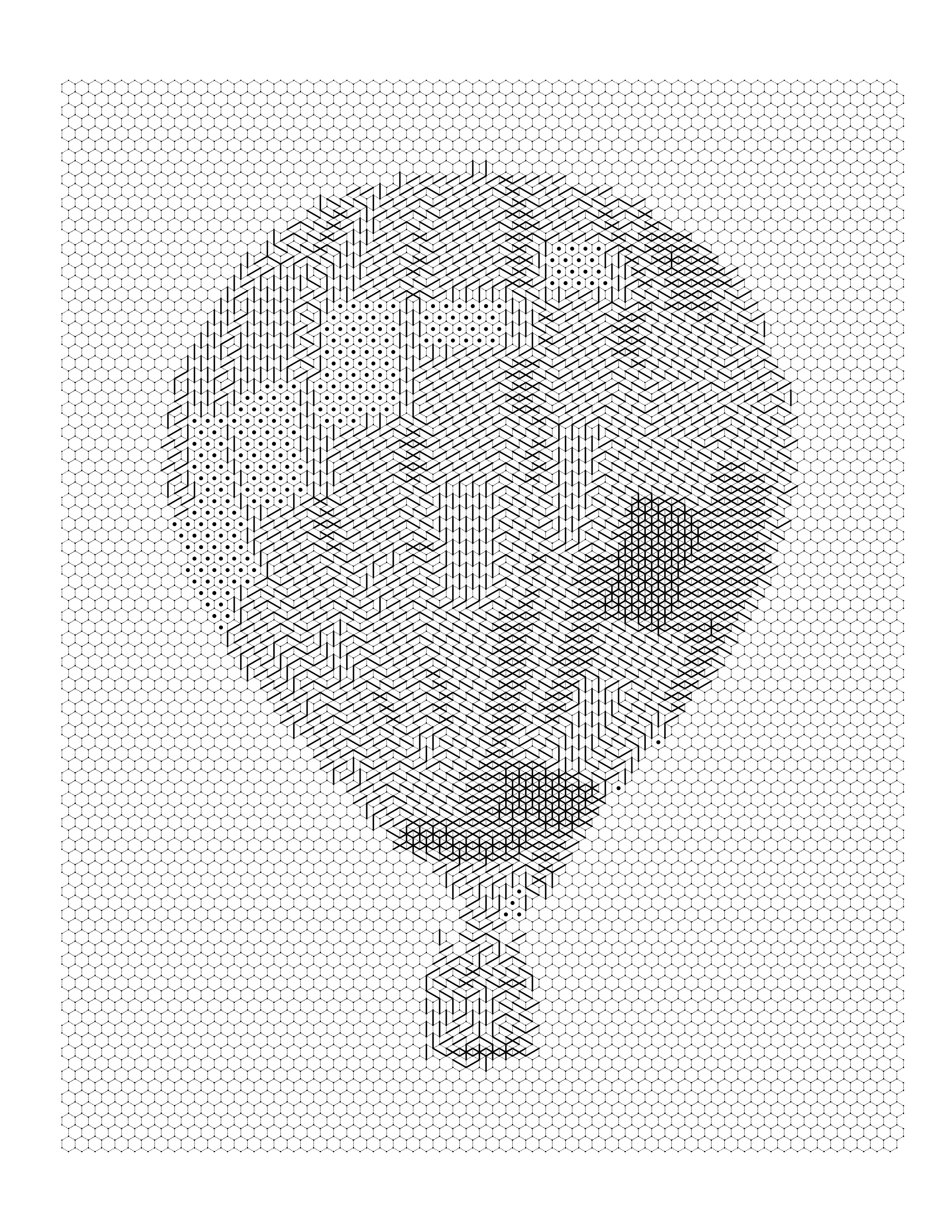
The hexagonal grid arranges cells in an offset honeycomb structure. Each hexagonal cell has six sides and shares boundaries with six neighbors. The resulting pattern is visually organic — it evokes natural structures like honeycomb, turtle shells, and basalt formations — and is significantly better at concealing the source image than a square grid.
Best Use Cases
- Mystery mosaic publications where the hidden image reveal is central to the experience
- Nature subjects — animals, plants, landscapes — where the organic cell shape suits the subject
- Decorative wall art where the grid itself is aesthetically interesting
- Intermediate to advanced colorists who appreciate additional visual complexity
- KDP publishers differentiated by visual style rather than price
Advantages
- Superior mystery effect: The offset honeycomb structure disrupts the horizontal and vertical edge cues that help colorists identify the subject early. The image remains hidden longer.
- Visually distinctive as both a blank puzzle and a completed artwork
- Organic aesthetic suits nature and botanical subjects exceptionally well
- The completed piece looks more sophisticated and decorative than square equivalents
- Strong differentiation factor for publishers and Etsy sellers
Disadvantages
- More demanding to color — angled cell boundaries are harder to fill neatly
- Requires finer coloring instruments (colored pencils preferred over markers for small cells)
- Slightly lower image fidelity than square grids at equivalent cell count
- More complex to print correctly — hexagonal grids expose any misalignment in scaling between PDF and printer output
- Number placement within small hexagonal cells can become illegible if the cell size is too small
Printing Quality
Good, with caveats. Hexagonal grids require higher print DPI (minimum 300, preferably 600) to render the angled cell boundaries cleanly. On low-quality printers, angled lines can appear jagged. Always test print before finalizing.
Typical Audience
- Intermediate to experienced colorists
- Nature and botanical art enthusiasts
- Mystery mosaic fans who prioritize the reveal experience
- Adult coloring book buyers who value visual sophistication
- Etsy buyers purchasing as decorative art projects
Common Mistakes
- Using hexagonal patterns for portraits: The offset structure does not reconstruct facial features as cleanly as square grids. Portraits in hexagonal patterns can look abstract even after completion.
- Too small cell size: Hexagonal cells smaller than a certain threshold produce numbers that are unreadable and cells that are physically impossible to fill with standard coloring instruments.
- Ignoring print testing: What looks crisp on screen can print with visible artifacts on the angled edges. Always print a test page before finalizing.
Professional Recommendation
Use hexagonal patterns when the mystery reveal is the primary product value, or when the subject is organic or nature-based. Avoid for portraits and fine detail work. Pair with colored pencils rather than markers for best results.
Dot Pattern
Overview
The dot pattern uses circular cells arranged in a regular grid. Each dot is a discrete circle with white space between cells. The result has a halftone or pointillist aesthetic — reminiscent of newspaper printing processes, Roy Lichtenstein paintings, or Georges Seurat's pointillist canvases.
Best Use Cases
- Decorative art projects where the aesthetic of the completed piece matters as much as image accuracy
- Subjects with smooth tonal gradients — skies, water, skin — where the soft circular cells create pleasing effects
- Younger children who find circular cells easier to color than bounded polygons
- Publishers targeting a retro, pop-art, or vintage aesthetic
- Designs intended for display as framed wall art after completion
Advantages
- Most forgiving format — color bleed between cells is not visible as a defect
- Pointillist aesthetic is visually beautiful in completed form
- White space between dots gives the completed piece an airy, light quality
- Easiest to color for people with fine motor challenges
- Retro halftone aesthetic has strong commercial appeal in certain market segments
Disadvantages
- Lowest image fidelity of the three patterns — the white space between dots discards image information
- Subjects with fine detail do not reconstruct well in dot format
- The white space means the completed piece always has a lighter, more open feel
- Less effective as a mystery format because the wide spacing reduces cells per unit area
Printing Quality
Excellent. Circular cells print cleanly on any printer. The open white space between cells means that minor print quality variations are less visible than in grid-based patterns. Dot patterns are the most tolerant of budget home printing.
Typical Audience
- Young children and families
- Casual hobbyists who prioritize ease over image accuracy
- Buyers seeking retro or pop-art aesthetic
- Occupational therapy and therapeutic coloring applications
- Publishers targeting the gift and seasonal coloring market
Common Mistakes
- Detailed subject with dot pattern: A highly detailed portrait reconstructed in dot format loses the fine detail that makes it recognizable. Use for simple, bold compositions only.
- Dark subjects: Because the white space contributes a constant light value, very dark subjects look lighter and flatter than intended.
- Over-printing: Dot patterns at very small cell sizes begin to look cluttered. The white space that defines the aesthetic disappears if cells are packed too tightly.
Professional Recommendation
Use dot patterns for subjects with strong, simple compositions and smooth tonal gradients. Avoid for portraits and detailed subjects. The format works exceptionally well for seasonal products where speed and ease are valued over precision.
Pattern Comparison
| Attribute | Square | Hexagon | Dot |
|---|---|---|---|
| Difficulty | Easy–Moderate | Moderate–Hard | Easy |
| Image Fidelity | High | Moderate | Low–Moderate |
| Mystery/Reveal Effect | Moderate | High | Low |
| Printing Requirements | Standard (300 DPI) | Higher (300–600 DPI) | Standard (300 DPI) |
| Coloring Speed | Fast–Moderate | Moderate–Slow | Fast |
| KDP Suitability | Excellent | Good | Good |
| Beginner Friendly | Yes | Partial | Yes |
| Professional Use | Yes | Yes | Partial |
| Portrait Accuracy | Excellent | Poor | Poor |
| Nature/Botanical Subjects | Good | Excellent | Good |
| Decorative Aesthetic | Moderate | High | High |
| Recommended Tool | Markers or Pencils | Colored Pencils | Any |
| Best Audience | All levels | Intermediate–Advanced | Beginners, Children |
| Home Printing Tolerance | High | Moderate | Very High |
Quick decision guide:
- Choose Square when image accuracy matters most, when your audience includes beginners, or when you are creating portraits
- Choose Hexagon when the mystery reveal experience is central, when your subject is organic or nature-based, or when visual distinctiveness matters for your brand
- Choose Dot when your audience includes young children or casual users, when the pointillist aesthetic fits your subject, or when home printing quality is a concern
What Photos Work Best?
The quality of your source photograph is the single largest determinant of the quality of your finished monochrome color by number. No processing tool can recover detail or contrast that was not present in the original image.
Lighting
What works: Diffused, even lighting that creates clear but soft tonal contrast across the subject. Natural window light, overcast outdoor light, and softbox studio light all work well. The goal is to illuminate the full subject without creating harsh shadows that block detail or blown-out highlights that eliminate texture.
What to avoid: Harsh direct sunlight creates deep shadows and bright highlights simultaneously. Flash photography pointed directly at the subject flattens tonal variation. Underexposed images lack midtone detail that the grid relies on. Backlit subjects are often silhouetted, which eliminates internal detail.
Practical tip: For pet portraits — one of the most common use cases — photograph near a large window on a bright but not directly sunny day. The diffused natural light reveals fur texture, eye detail, and facial structure without the harsh contrasts that reduce grid quality.
Composition
What works: A single clear subject occupying most of the frame. Simple backgrounds. Strong visual separation between subject and background. Subject placement that keeps the focal point within the central portion of the grid.
What to avoid: Multiple competing subjects at similar sizes. Complex, busy backgrounds that blend with the subject. Very small subjects in large empty frames — the grid will allocate most cells to empty background, wasting resolution on uninteresting tonal areas.
Practical tip: If your photo has a busy background, crop tightly before processing, or use a photo editing tool to blur or desaturate the background before conversion. The conversion process will reward any pre-processing work you do on composition. The photo to coloring page workflow supports background simplification before grid generation.
Contrast
Contrast Is What You Are Actually Converting
A monochrome page has only tone to work with. A source that never gets properly light or properly dark reduces to two or three marks, and there is no picture left in it.
What works: Images with a full tonal range — true blacks, true whites, and a rich distribution of midtones between them. High contrast between subject and background produces clean, recognizable grid outlines.
What to avoid: Flat, grey images with a narrow tonal range. Low-contrast images produce grids where many cells share similar shade numbers, making the completed piece look muddy.
How to check: Convert your source image to grayscale in any photo editor and examine the histogram. A good source image has data spread across the full width of the histogram. An image with data clustered in the middle — no true blacks, no true whites — will produce poor grid output.
Resolution
Minimum: 1000×1000 pixels for a standard 8.5×11 inch printable at moderate grid density.
Recommended: 2000×2000 pixels or higher for fine grid density or detailed subjects.
Why it matters: Each cell in the grid is generated by averaging the pixel data in that region of the source image. If the source image resolution is too low, individual cells may contain only a few pixels, meaning the averaging process captures almost no useful tonal information. The result is a noisy, inconsistent grid where adjacent cells have seemingly random shade assignments.
Background
What works: Plain, single-tone backgrounds — white, grey, a solid color. Studio photography with seamless paper backgrounds is ideal. Outdoor photography with a distant, blurred background works well.
What to avoid: Cluttered backgrounds with many objects, patterns, or textures. Backgrounds with similar tonal values to the subject. Backgrounds with strong geometric patterns that will compete with the grid structure.
Subject Selection
Not all subjects convert equally well. The format inherently prioritizes tonal structure over color information, so subjects with strong tonal variation and recognizable silhouettes perform best.
Excellent subjects:
- Pets — dogs, cats — with distinct fur texture and facial features
- Portraits with strong facial structure and clear lighting
- Single flowers with distinct petals and center detail
- Birds with strong silhouettes and feather texture
- Landscapes with clear horizon lines and distinct foreground/background separation
Challenging subjects:
- Groups of people or animals (complexity overwhelms cell resolution)
- Fine text or lettering (grid cells cannot reconstruct thin strokes accurately)
- Very small subjects in large frames
- Subjects photographed in low light with significant digital noise
- Subjects with very similar tonal value to their background
For a detailed breakdown of exactly which photo attributes matter most and why, see best photos for coloring page conversion.
Image Complexity
There is a productive tension between detail and completability. More detail produces a more impressive finished piece, but also produces more cells, more shade numbers, and a longer completion time.
A good rule of thumb: the number of cells should match the intended audience's patience and skill level. A children's classroom sheet should use large cells and few shades. An adult hobbyist's premium puzzle book can use fine cells and 10–12 shade steps.
Common Mistakes and How to Fix Them
Understanding what goes wrong — and why — is more useful than a list of rules. Each of the following mistakes has a specific cause and a specific fix.
1. Poor Lighting
What happens: The grid produces cells with little tonal variation. The completed piece looks flat. The subject is difficult to identify even after all cells are colored.
Why: Poor lighting compresses the tonal range of the source image. When all tonal values cluster in the midrange, the shade mapping assigns similar numbers to most cells, eliminating the contrast that creates the image illusion.
Fix: Reshoot with diffused natural light. Alternatively, use photo editing software to expand the tonal range — increase contrast, use a levels or curves adjustment — before conversion. Aim for a histogram that uses the full range from black to white.
2. Busy Background
What happens: The completed grid looks chaotic. No clear subject emerges. The reveal is unsatisfying because background and subject are visually inseparable.
Why: The grid treats all regions of the image equally. A complex background contributes as many cells as the subject. Without a clear visual hierarchy, the completed piece reads as random pattern rather than coherent image.
Fix: Crop tightly to the subject before conversion. Or use background removal to isolate the subject against a plain background. Even a simple blur applied to the background region dramatically improves clarity.
3. Choosing the Wrong Pattern for the Subject
What happens: A portrait processed through a hexagonal grid looks abstract and unrecognizable. A nature scene processed through a square grid looks rigid and artificial.
Why: Pattern selection affects image reconstruction fidelity as well as aesthetic quality. Square grids reconstruct straight edges and geometric features more accurately. Hexagonal grids diffuse those same straight edges.
Fix: Match pattern to subject type. Portraits and architectural subjects — square. Nature, botanical, organic subjects — hexagonal. Simple bold subjects for casual use — dot. The pattern comparison table above provides a complete reference.
4. Too Many Details in Source Image
What happens: The grid is overwhelming. The cell count is very high. Numbers are tiny and hard to read. The coloring time is impractical for the intended audience.
Why: Processing a highly detailed image at fine grid density produces a very large number of cells. Fine grid density is sometimes necessary for detail preservation, but unnecessary complexity — detailed backgrounds, multiple subjects — raises the cell count without adding useful image information.
Fix: Simplify the source image before conversion. Crop to the essential subject. Remove or blur the background. If the grid still produces too many cells, increase the cell size to coarsen the grid.
5. Low Resolution Source Image
What happens: The completed piece has visible pixelation or a blocky quality where cells should show smooth tonal gradients. Adjacent cells have inconsistent shade assignments that create a noisy appearance.
Why: Low resolution means each grid cell is derived from very few pixels. Random pixel-level variation — compression artifacts, noise, minor color shifts — creates inconsistent cell values that survive the averaging process.
Fix: Always use the highest resolution version of the source image available. If only a low-resolution version exists, an AI upscaling tool can recover some detail. However, the best solution is always to start with a high-quality original.
6. Wrong Expectations About the Format
What happens: The user is disappointed that the completed piece does not look exactly like the photo, or that the image is too obvious if the grid is coarse.
Why: Monochrome color by number is a tonal approximation of the source image, not a pixel-perfect reproduction. The cell structure averages and simplifies. The shade palette is finite. Some loss of fine detail is inherent to the format.
Fix: Always review the colored reference version before printing the puzzle. If the colored version does not satisfy you, adjust the grid size, shade count, or source image before generating the final PDF. The reference version is your quality checkpoint.
For a complete deep-dive on what goes wrong and why, see the common mistakes guide for photo to coloring page conversion.
Professional Tips Summary
- Always review the colored reference version before finalizing
- Test print on the same printer the intended audience will use
- For KDP, print a physical proof copy before listing
- Match cell size to the intended coloring instrument — large cells for markers and crayons, small cells for colored pencils
- Design the palette with evenly distributed tonal steps, not clusters at the light or dark end
Gallery Showcase
The following real conversions demonstrate how monochrome color by number handles different subjects. Each example shows the blank numbered grid, the completed colored version, and the shade palette used to produce it.
Example 1: Hot Air Balloon — Square Pattern
Subject: Hot air balloon against open sky Pattern: Square | Palette: Blue monochrome
The strong geometric form of the balloon envelope and basket maps cleanly to the square grid. Clear separation between the balloon and the sky produces well-defined cell boundaries throughout.

Lesson: Subjects with a strong, simple silhouette against open sky are ideal for square patterns — the clean background leaves the full detail budget for the subject itself.
Example 2: Samurai — Square Pattern
Subject: Samurai figure, detailed armor and pose Pattern: Square | Palette: Blue monochrome
The fine detail in the armor plating and silhouette benefits from the square grid's higher image fidelity. Strong tonal contrast between the figure and background keeps the pose legible even in the blank grid.
Lesson: Detailed, figure-based subjects with distinct silhouettes reconstruct well in square patterns because straight edges and fine contours are preserved more accurately than in hexagon or dot grids.
Example 3: Shark — Square Pattern
Subject: Shark in open water Pattern: Square | Palette: Blue monochrome
The shark's smooth body contours and the surrounding water create a natural tonal gradient that the square grid renders as a clean, recognizable form once colored.

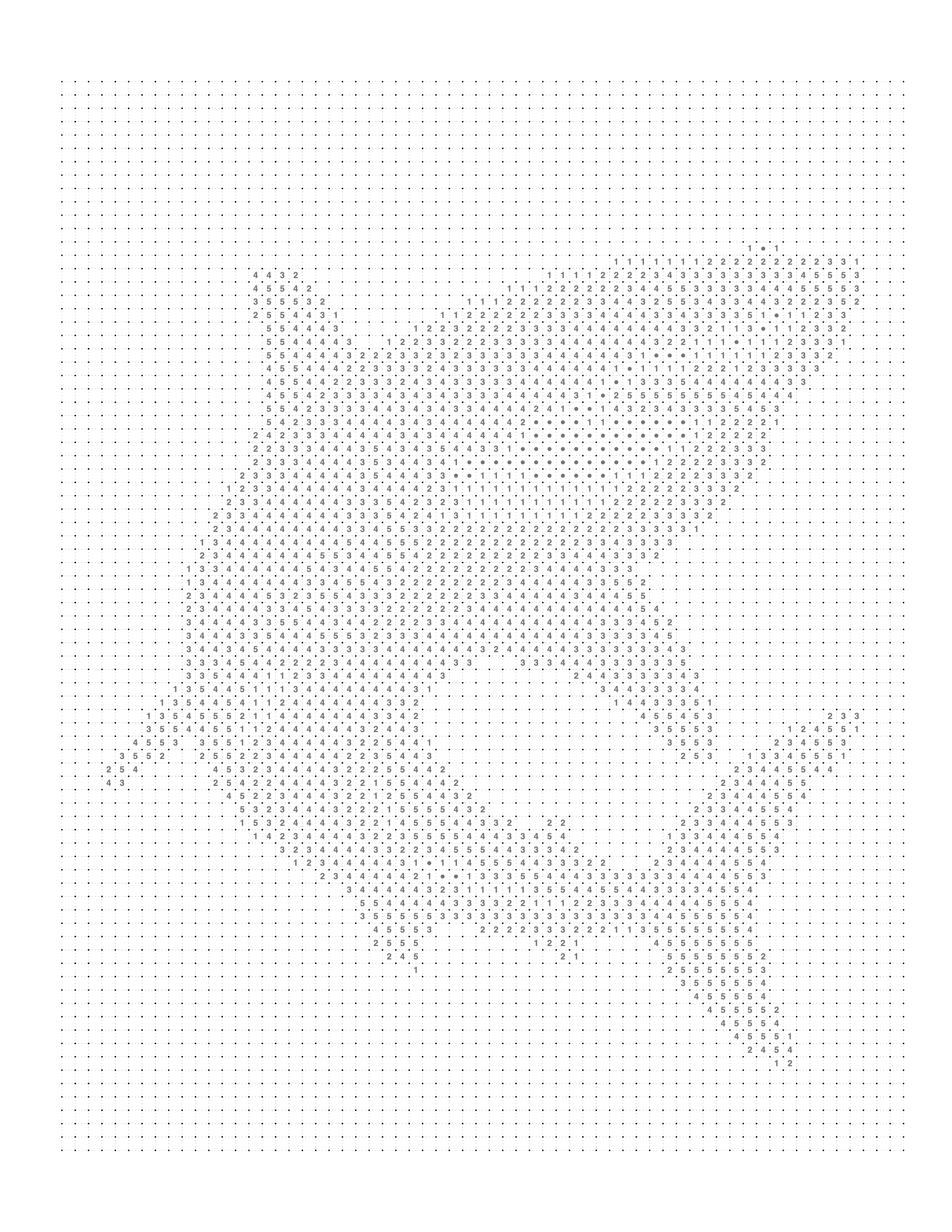
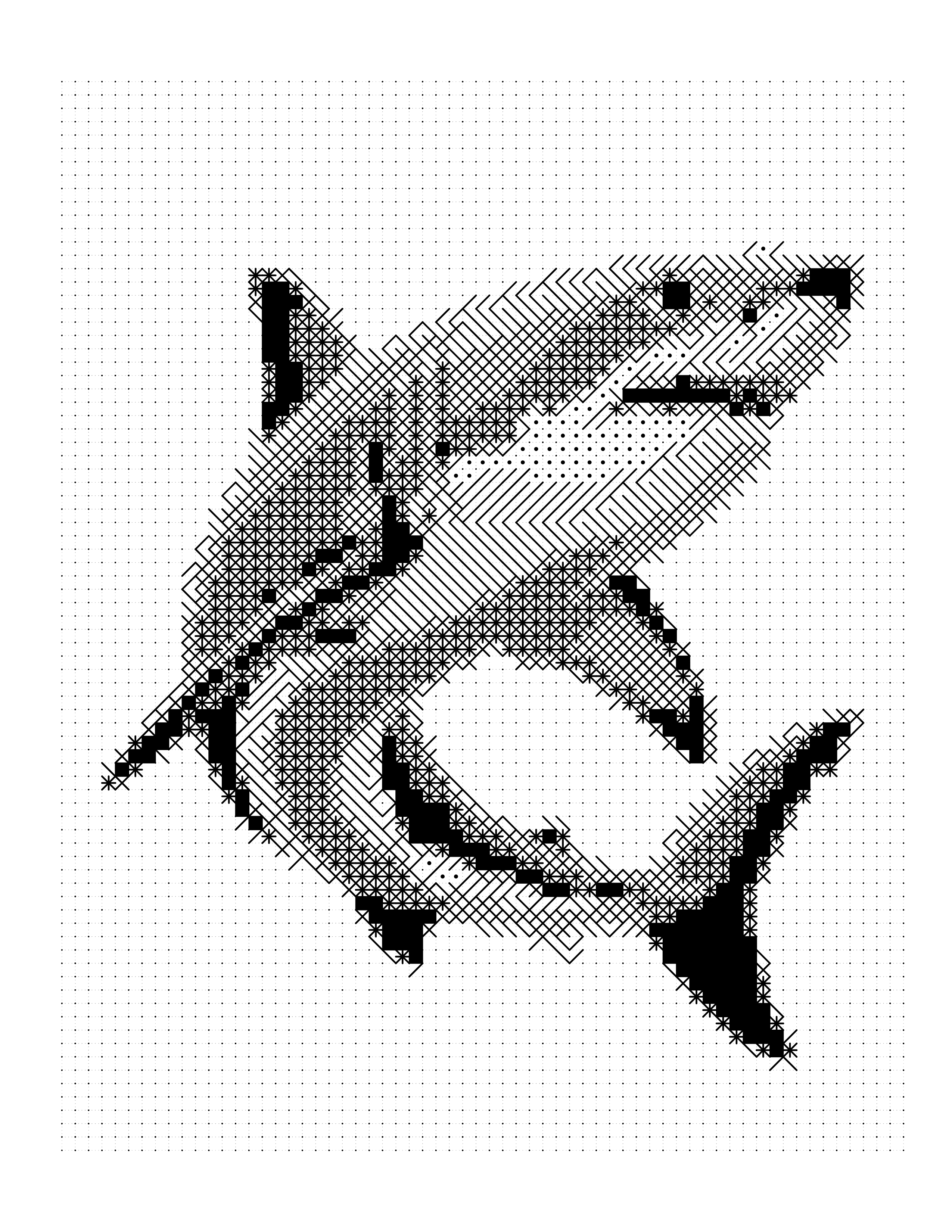
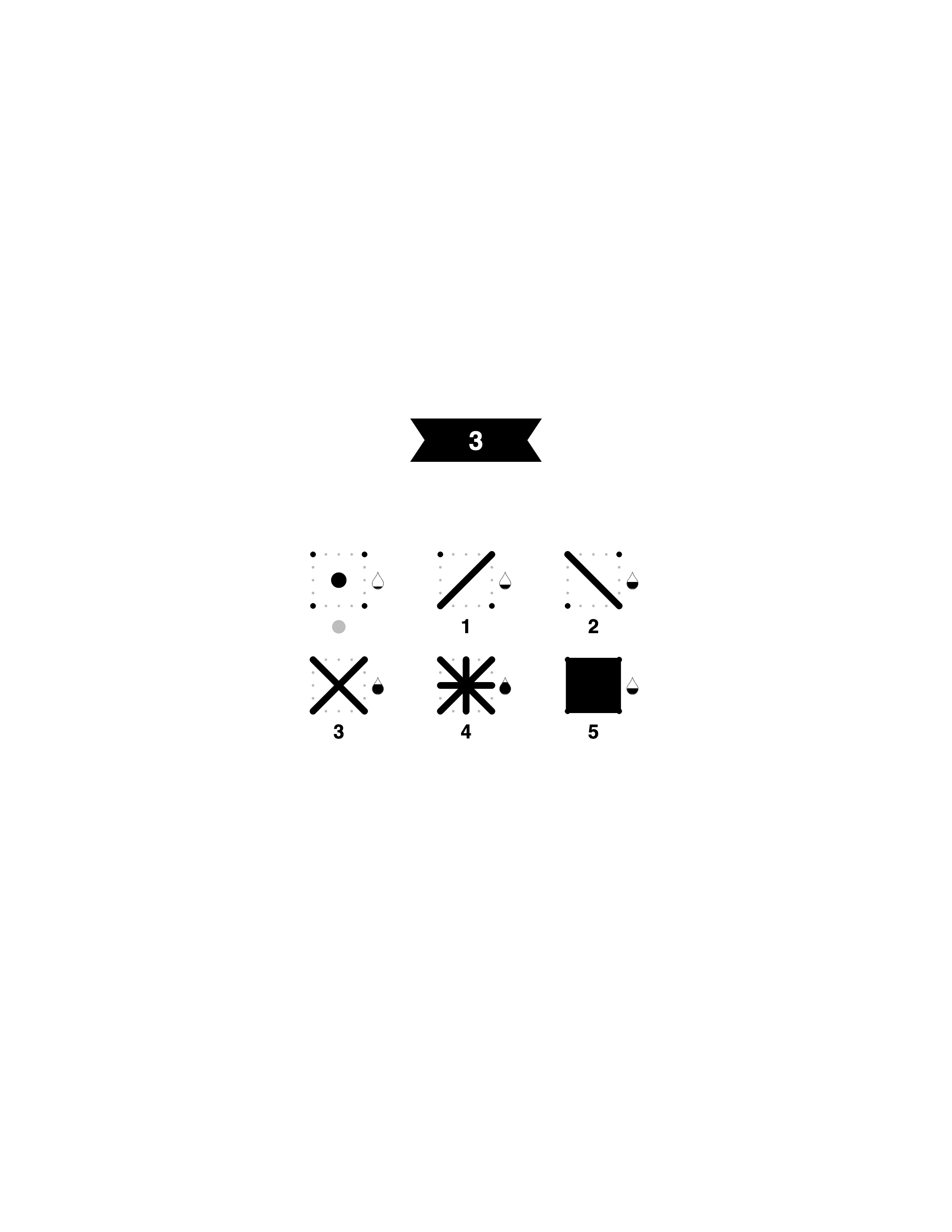
Lesson: Marine and wildlife subjects with a single dominant form against open water or sky are dependable choices — the plain background keeps the grid focused entirely on the subject's silhouette and texture.
Make Your Own
To make one, choose a photo with a clear subject and good contrast, pick one of the three patterns, and preview the result before you export. The monochrome color by number tool walks through the settings, and the monochrome styles cost 2 credits per generation, against 1 for the color patterns. For a whole book, see how to create a mystery coloring book from photos and the KDP color by number guide.
Proofing the Page Before You Publish
Everything that goes wrong with a monochrome page goes wrong on paper, and almost none of it is visible on a screen. A mark that is perfectly clear at 200% zoom can be an unreadable speck at printed size, and two adjacent levels that look distinct on a backlit display can be indistinguishable in graphite on white.
There is one check that catches nearly all of it: print a single page at final size, on the paper you actually intend to use, and color a corner of it.
What to Check on the Proof Print
Everything here fails silently on screen and obviously on paper. One sheet at final size, printed on the paper you will actually use, answers all of it.
Work through it in this order:
- Read the marks at arm's length. Not at reading distance, and not with a magnifier. If you cannot tell a single diagonal from a crossed one without leaning in, the grid is too fine for the page size.
- Check both ends of the ramp. The lightest mark should be visible rather than an apparently blank cell, and the darkest should read as solid rather than as a grey smudge. Ink starvation at the dark end is a printer problem; an invisible light end is usually a resolution problem.
- Color ten or fifteen adjacent cells. This is the step people skip, and it is the one that reveals whether cell borders survive a pencil crossing them and whether your own shading can actually hit distinct densities.
- Look at the reference image last. If the completed version does not read as the subject, no amount of print tuning will rescue the page — go back to the source photo.
For a single page that is the whole process. For a book, the same proof also has to settle the decisions that must hold across every page — one pattern, one cell size, and a consistent difficulty — before the rest are converted. Creating a mystery coloring book from photos covers planning at that scale, and how to create a color by number book for Amazon KDP covers the interior arithmetic.
Conclusion
Monochrome color by number occupies a genuinely interesting intersection. It is meditative enough to serve as stress relief. It is structured enough to function as an educational tool. It is puzzle-like enough to be genuinely engaging. And it needs nothing more than a pen or pencil.
The format works because it is built on a clever mechanism: the same single-color tonal logic that creates the puzzle also creates the reveal. The hidden image does not require special materials or complex printing — it is simply a consequence of the way our visual system reconstructs tonal patterns into recognizable forms.
For creators, the practical recommendations come down to a few principles:
Match your pattern to your subject. Square for portraits and precision. Hexagon for mystery and organic subjects. Dot for simplicity and decorative appeal.
Start with a better photo than you think you need. Most disappointing results trace back to source image quality. Diffused lighting, plain background, high resolution, strong contrast — these inputs determine your output ceiling.
Use the reference version before finalizing. The colored preview is your quality checkpoint. If it does not satisfy you, the printed puzzle will not either.
Set appropriate expectations for your audience. A fine-grid, 12-shade puzzle is a multi-hour project suited to dedicated hobbyists. A coarse-grid, 6-shade puzzle is a 90-minute activity suitable for children or casual users. Neither is better — they serve different needs.
If you are ready to create your own, Mosaci's color by number generator handles the conversion process from photo to print-ready PDF, with support for all three pattern types. For inspiration before you start, the gallery shows real examples across subjects, patterns, and palette choices.
The mystery is always waiting in the grid. You just have to start coloring.
Printable quality checklist
- Choose a photo with strong contrast between subject and background
- Use diffused natural or studio lighting — avoid harsh direct flash
- Ensure resolution is at least 1000×1000px (2000px+ recommended)
- Simplify or remove complex backgrounds before converting
- Select the right pattern — square for portraits, hexagon for nature, dot for simple bold subjects
- Set shade count to match your audience — 4–6 for children, 8–12 for adults
- Review the colored reference version before generating the final PDF
- Print a test page before finalizing any KDP or Etsy product
- Match cell size to the intended coloring instrument — larger cells for markers, smaller for pencils
Key takeaways
- Monochrome color by number uses one color in multiple shades to hide an image inside a numbered grid — the subject is invisible until coloring is nearly complete.
- The format combines the meditative quality of coloring with the puzzle satisfaction of a hidden-image reveal.
- Three grid patterns are available — square, hexagon, and dot — each with distinct visual qualities, difficulty levels, and ideal use cases.
- Square grids deliver the highest image fidelity and suit portraits; hexagonal grids maximize the mystery effect and suit organic subjects; dot grids are the most forgiving and produce a pointillist aesthetic.
- Source photo quality determines output quality more than any tool setting — strong contrast, diffused lighting, plain background, and high resolution are the key inputs.
- Mosaci Studio converts personal photos into monochrome color by number PDFs across all three pattern types, with a colored reference version as a quality checkpoint before export.
Frequently asked questions
What is monochrome color by number?
Monochrome color by number is a type of printable puzzle where an image is divided into a grid of cells — square, hexagonal, or circular — and each cell is assigned a number corresponding to a specific shade of a single color. Filling in all cells with the correct shade reveals a hidden image. The word monochrome means one color: the entire artwork uses tonal variations of one hue rather than a full color palette.
What does monochrome mean in this context?
In monochrome color by number, monochrome means the entire artwork uses shades of a single hue — such as ten shades of blue ranging from pale ice to deep navy — rather than a multi-color palette. The Greek root mono (one) and chroma (color) describes the core constraint of the format.
What is the difference between monochrome color by number and mystery mosaic?
The terms are often used interchangeably. Both use a numbered grid and a single-color palette that hides an image until coloring is nearly complete. Mystery mosaic tends to emphasize the hidden-image reveal aspect and is sometimes used specifically for hexagonal cell patterns, which are particularly effective at concealing the source image.
What is the difference between monochrome color by number and paint by numbers?
Paint by numbers uses a full multi-color palette mapped to irregularly shaped regions. The outlines of those regions are visible before coloring begins, making the subject partially recognizable. Monochrome color by number uses a single-color palette in a regular grid, and the subject is completely hidden until the grid is filled.
Can I create a monochrome color by number from my own photo?
Yes. Photo-to-grid conversion tools process a source photograph through tonal analysis to generate a numbered grid automatically. The quality of the output depends on the source photo — high contrast, clear subject, plain background, and sufficient resolution all produce better results. See our guide on how to turn a photo into a coloring page for a detailed walkthrough.
Which pattern is best for beginners — square, hexagon, or dot?
Square and dot patterns are most accessible for beginners. Square patterns provide the clearest image reconstruction and a familiar grid structure. Dot patterns have open white space between cells that makes coloring forgiving of minor imprecision. Hexagonal patterns are better suited to intermediate users who want the maximum mystery effect and are comfortable with more demanding coloring.
What coloring supplies work best with monochrome color by number?
The best choice depends on cell size. Large cells work well with markers, crayons, or colored pencils. Medium cells are best with colored pencils or fine-tip markers. Small cells require fine-tip colored pencils or ultra-fine markers only. For single-color palettes with many shades, a quality colored pencil set with clear tonal differentiation across the range produces the best results.
How many shades should a monochrome color by number have?
Most commercially produced monochrome color by number books use 6 to 12 shades. Six shades produce a simpler, faster puzzle with more visible tonal banding. Ten to twelve shades produce smoother gradients and more detailed images but require a larger pencil set. For children's educational products, 4–6 shades are appropriate.
Is monochrome color by number suitable for children?
Yes, with appropriate settings. Large cell sizes, few shade steps (4–6), and simple bold subjects make monochrome color by number accessible to children aged 6 and up. The number-matching aspect provides a light educational element. For very young children (under 5), cells should be large enough that fine motor precision is not required.
Can monochrome color by number be used for Amazon KDP publishing?
Yes. The Mosaci Studio license allows selling generated outputs through platforms such as Amazon KDP, provided you own or have permission to use the source photos. Black-and-white interiors cost less to print than color ones, and the monochrome styles need only a pen to complete. The KDP color by number guide on this site covers the workflow.
What file format should I use for KDP interior files?
KDP accepts PDF files for interior pages. The PDF should be sized to match your book's trim size with appropriate margins. For a standard 8.5×11 inch interior, use a PDF at 300 DPI minimum. Always download and review a KDP digital proof before approving for publication.
What is the best photo subject for monochrome color by number?
Pet portraits are the most popular and consistently successful subject. Single animals — dogs, cats, birds — photographed with diffused natural light and a plain background produce high-quality grids that reconstruct the subject clearly. Single flowers, simple landscapes, and human portraits are also strong choices. Complex group photos, night scenes, and very detailed subjects generally produce poorer results.
How long does it take to complete a monochrome color by number?
Completion time depends on cell count and size. Large cells with a coarse grid and simple subject take 30–90 minutes. Medium cells with a standard grid take 2–4 hours. Small cells with a fine grid and complex subject can take 4–8 hours or more. Many adult hobbyists complete their puzzle across multiple sessions, which suits the format's meditative, stress-relief qualities.
Can monochrome color by number be printed at home?
Yes. Most monochrome color by number PDFs are designed for standard home printing on US Letter or A4 paper. A standard inkjet or laser printer produces acceptable results. For best quality, use the printer's maximum DPI setting and standard white paper or inkjet-specific paper.
What is the difference between color by number and photo-to-color-by-number?
Traditional color by number was designed by an artist who manually mapped regions to palette colors. Photo-to-color-by-number uses automated tonal analysis to generate the numbered grid directly from a photograph. AI-assisted conversion makes it possible to create custom, personalized color by number puzzles from personal photos without manual artistic work.
Why does my completed monochrome color by number not look exactly like the original photo?
Monochrome color by number is a tonal approximation, not a pixel-perfect reproduction. The grid cell structure averages fine detail. The finite shade palette simplifies smooth gradients into discrete steps. And the physical coloring medium introduces its own variations. The best results come from source photos with strong contrast and clear subject structure, combined with settings matched to the subject complexity.
What resolution should my source photo be?
A minimum of 1000×1000 pixels is recommended for standard grid density. For fine grid density or large print sizes, 2000×2000 pixels or higher produces noticeably better results. Low-resolution images — under 800 pixels in either dimension — often produce noisy, inconsistent grids that do not reconstruct the source image cleanly.
Can I sell monochrome color by number books I create from my own photos?
If you created or own the rights to the source photographs, yes. If you are using photographs you did not create — stock photos, images found online — you must verify that the license permits commercial use and the creation of derivative works. Always use only images you own or have a clear commercial license for when creating products for sale.
Are there accessibility benefits to monochrome color by number?
Yes. The single-color format eliminates color differentiation challenges for people with color blindness affecting multi-color perception. The numbered system removes color judgment entirely — the coloring experience relies only on number identification rather than color perception. For users with certain visual or cognitive conditions, this structured, number-guided approach to coloring may be more accessible than freeform alternatives.
Related tools
Monochrome Color by Number
Make a one-pen mark page from your own photo.
Color-by-Number Generator
Turn any photo into a monochrome color by number grid — print-ready PDF with palette legend included.
Photo to Coloring Page Converter
Convert an image into a numbered mosaic coloring page and export a print-ready PDF.
Mosaic Coloring Page Maker
Create square, hexagon, or dot mosaic coloring pages from your own photos.
Written by
Mosaci Studio TeamThe team behind Mosaci Studio
Mosaci Studio is built to help KDP publishers, Etsy sellers, and hobby artists turn photos into print-ready coloring pages without any design experience.
Published Jun 30, 2026 · Updated Oct 6, 2026