
Quick answer
People searching for an AI photo-to-coloring-page tool usually have a practical question: will this work on my photo, and why did the last attempt look wrong? The honest answer starts with the fact that "AI" covers several different methods, and they fail in different ways. It also helps to know that not every photo-to-coloring-page tool is an AI tool, and not every coloring page is line art.
This article explains, in general terms, how AI coloring page tools turn photos into line art and where they tend to go wrong. It then describes how Mosaci Studio works, because it takes a different approach: it does not use AI and does not draw outlines. It turns a photo into a numbered mosaic grid.
Can AI Turn a Photo Into a Coloring Page?
Yes, reliably for some photos and unreliably for others. The difference is mostly decided by the photograph before any software runs.
What AI line-art tools do well is speed. They simplify an image in seconds, which makes it cheap to try several photos and keep the best one. What they cannot do is recover information the photograph never contained. If you cannot see where the subject ends in the original, a tool has to guess, and different tools guess differently.
A coloring page is also not a black-and-white filter. A simple threshold keeps whatever is dark, so dark ears survive while a mid-toned face disappears. A line-art coloring page has to keep the boundaries that make the subject recognizable, drawn as continuous lines, with empty areas between them. Making that judgment is the hard part.
How AI Line-Art Tools Generally Work
Tools described the same way can work quite differently. Two broad approaches are common, and knowing which one you are using predicts how it will fail.
Generative tools redraw. A generative model produces a new image that looks like a coloring page version of your photo. It is drawing something new, guided by the photo, rather than tracing it. That is why the output can look polished, and also why it is risky where likeness matters: it can add detail that was never there, or shift a face just enough that the people who know the subject notice.
Recognition-based tools identify, then trace. These use trained models to work out what the subject is and where it ends, then draw lines along those boundaries. They can be good at removing a background. Their typical failure is a confident mistake: a tail, a hand or a held object gets treated as background and disappears.
Either way, the output is line art: outlines you color however you like.
The Same-Photo-Twice Test
A quick way to learn something about a tool is to convert the same photo twice with identical settings and compare. If the pages differ, the tool is sampling, which means you can try again for a better page but cannot rely on it preserving a likeness. If the pages are identical, what you see is what the process computes from your photo, so a bad result points back to the photo or the settings.
What to Check Before Trusting a Tool
Does it show the result before you commit? Conversion is quick, so you should be able to see what your own photo produces before paying.
Where does the photo go? Some tools process on a server; others in the browser. This matters more for photos of children than for photos of flowers, and the answer belongs in a privacy policy.
Does it export at a real page size? A screen-sized image leaves you to solve printing yourself.
Does it invent anything? Compare a collar, a button or a strand of hair in the output with the same spot in the photo. Detail in the page that is not in the photo was made up.
Where AI Line Art Tends to Struggle
Texture is the most common problem. Fur, foliage, gravel and knitwear contain huge numbers of small boundaries. Keeping them all gives dense scribble with nothing large enough to color; dropping them can break the main contour.
Low contrast is the next. Where a subject sits against a background of nearly the same tone, there is little to separate them, so an outline stops or a tool guesses. Overlapping subjects and small features such as eyes and hands suffer for the same reason. And hard shadows read as boundaries, so the edge of a shadow can be drawn as if it were part of the subject.
These are properties of the photo as much as of the tool, which is why How to Prepare a Photo for Coloring Page Conversion and What Makes a Good Photo for Color-by-Number Conversion? are worth reading whichever tool you use.
A Non-AI Alternative: The Numbered Mosaic Grid
Mosaci Studio takes a different route, and it is worth being clear about what it does and does not do. It is not AI-powered. It does not trace, redraw or generate anything, and it produces no outlines. It reads the colors in your photo and quantizes them: the image is reduced to a palette of 4 to 23 colors (12 by default), and the picture is divided into a grid of cells, each assigned the number of its nearest palette color.
The output has three parts:
- The coloring page: a grid of empty cells, each holding the number of its color. No picture is visible yet.
- The filled preview: the same grid colored in, showing what the finished page will look like.
- The palette page: the color key matching each number to a color.
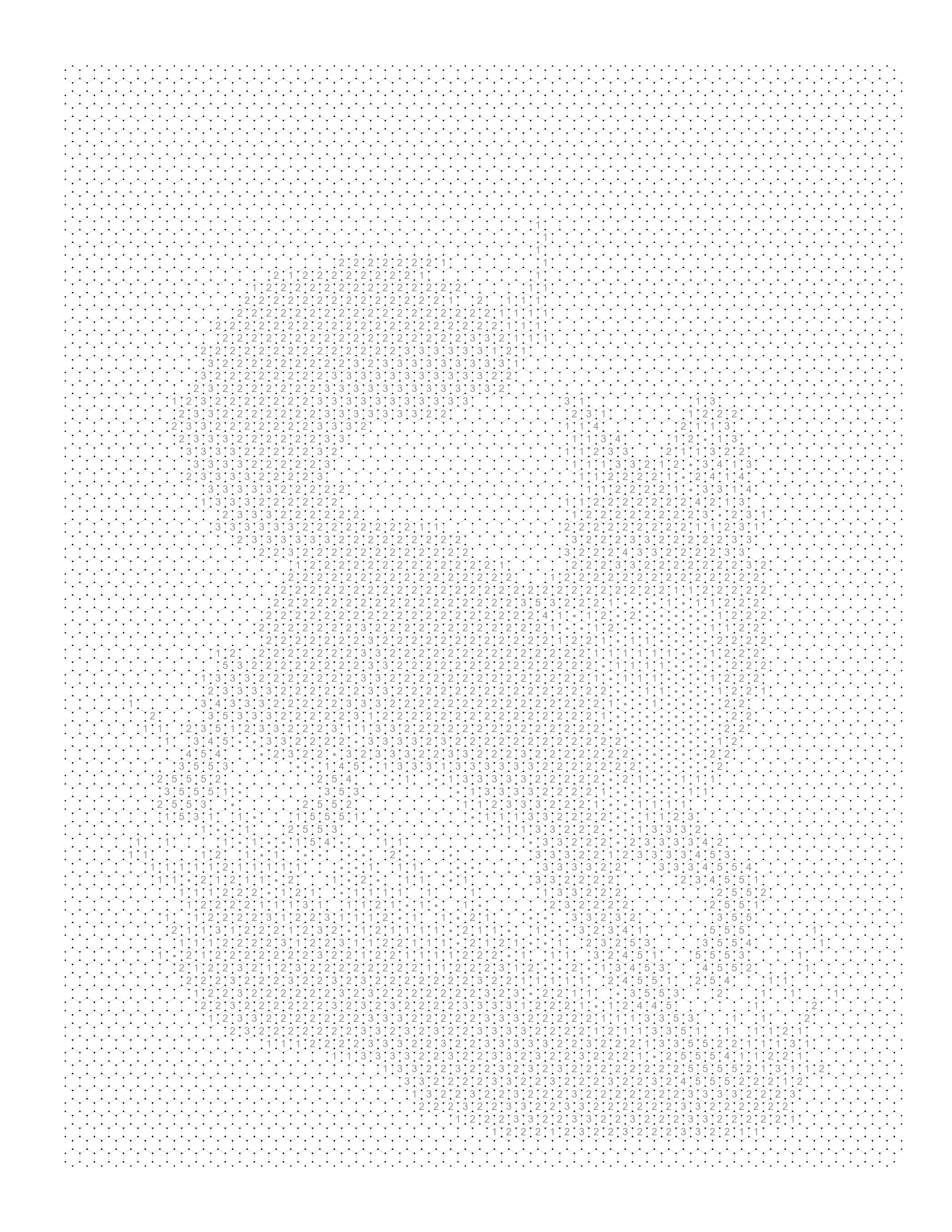
The image appears only as the cells are colored in. That is a different experience from line art: rather than coloring inside outlines however you like, you follow the key, and the finished page resembles the source.
Because the process is computed rather than sampled, the same photo with the same settings always gives the same page. Nothing appears that was not in the photo; at most, small details merge into a neighboring cell when the cells are too large or the palette too small. The conversion runs in your browser.
The Settings That Matter
- Color count (4–23). Fewer colors give broader areas and an easier page; more colors keep more tonal variation.
- Cell size (12–36). Smaller cells keep finer detail; larger cells give fewer, bigger cells that are easier to color.
- Pattern. There are 8 color mosaic patterns and 2 monochrome mark styles. The color patterns are Square, Circle, Diamond, Hexagon, Puzzle, Islamic, Fish Scale and Trapezoid; Trapezoid has the most regions and Circle the fewest. Mark styles such as Square Mark and Hexagon Mark render tone with ink marks using one pen, so color count does not apply to them.
Pages export as a print-ready PDF at 300 DPI on 8.5 × 11 in. Converting is free; every pattern, mark styles included, uses 1 credit per image when you download it, with 10 free credits each month. The Mosaic Pattern Guide compares the patterns.
AI Line Art vs a Numbered Mosaic
| AI line-art tools | Mosaci numbered mosaic | |
|---|---|---|
| Output | Outlines to color freely | Grid of numbered cells plus a color key |
| Method | Generated or traced by a trained model | Color quantization onto a grid, no AI |
| Repeatability | May vary between runs | Same settings, same result |
| Invented detail | Possible with generative tools | None; colors come from the photo |
| Textured photos | Often become dense scribble | Cell size sets the level of detail |
| Best for | Free coloring of a recognizable outline | A finished page that resembles the photo |
Neither is better in general. If you want open outlines, a line-art tool is the right category. If you want the page to resemble the photo once colored, a numbered grid fits better.
How to Improve a Result You Do Not Like
Work out what failed before changing settings. If the subject is not recognizable, the fix is usually a tighter crop or a different photograph. With a line-art tool, a dense page usually means too much detail; with a numbered mosaic, it means the cells are too small or there are too many colors, so raise the cell size or lower the color count. If the subject and background merge, the photo lacks contrast there, and a different background or better light helps more than any setting. If the page looks good on screen but poor on paper, check the print size. Why Your Photo Looks Bad as a Coloring Page goes through these symptoms one by one for numbered grids.
Frequently Asked Questions
Conclusion
AI photo-to-coloring-page tools can turn a photograph into line art quickly, but "AI" covers different methods. Generative tools draw something new and may not preserve likeness; recognition tools decide what your subject is and sometimes decide wrongly. Running the same photo twice tells you a lot about which you have.
Mosaci Studio is a different, non-AI option. It turns the photo's colors into a numbered mosaic grid with a color key, invents nothing, and gives the same result for the same settings. Whatever tool you use, the source photo sets the ceiling: a clear subject, good contrast and even light matter more than any setting.
To see what your photo looks like as a numbered page, try the Photo to Coloring Page Converter, which is free to start, or browse the example gallery first.
Related Articles
Printable quality checklist
- Decide whether you want line art (outlines to color freely) or a numbered page (cells colored from a key)
- Run the same photo twice with the same settings and compare the results
- Compare a few details in the output against the photo to see whether anything was invented
- Check that the subject fills enough of the frame to survive simplification
- Print one page at final size before converting a whole set
Key takeaways
- Most AI coloring page tools produce line art, either by generating a new drawing or by recognizing the subject and tracing it.
- Generative tools can return a different page each run and may invent detail; recognition tools can drop parts of the subject they misclassify.
- Running the same photo twice with the same settings is a quick way to see whether a tool samples or computes.
- Mosaci Studio is a non-AI alternative: it quantizes the photo's colors onto a numbered mosaic grid, with no outlines drawn.
- On a Mosaci page the picture appears only as the numbered cells are colored in, and the same settings always produce the same result.
Frequently asked questions
How do AI tools turn a photo into a coloring page?
In general terms, they either generate a new line drawing guided by your photo, or they use a trained model to find the subject and trace boundaries around it. Both aim to keep the shapes that make the subject recognizable and discard tone, color and texture. How well that works depends mostly on how clearly the subject stands out in the original photo.
Why does an AI coloring page sometimes look messy or wrong?
Texture such as fur, grass and fabric contains many small boundaries, and a tool that keeps them produces dense line work with nothing large enough to color. Generative tools have a different failure: they can add detail that was not in the photo or subtly change a face, because they draw something new rather than copying what is there.
Is Mosaci Studio an AI coloring page generator?
No. Mosaci Studio does not use AI image generation and does not draw outlines. It reads the colors in your photo, reduces them to a palette of 4 to 23 colors, and places each color's number in a grid cell. The result is a numbered mosaic coloring page plus a color key, and the image appears only as the cells are colored in.
Does Mosaci give the same result every time?
Yes. The conversion is deterministic, so the same photo with the same color count, cell size and pattern produces the same page. If a result looks wrong, the useful fix is in the photo or the settings, such as a tighter crop or a different color count, not in running it again.
When is line art a better choice than a numbered mosaic?
If you want open outlines to color however you like, a line-art tool is the right category. A numbered mosaic suits people who want the finished page to resemble the photo, because each cell is colored from the key. It also handles textured photos well, since cell size is a setting rather than something the photo decides.
Does converting a photo mean uploading it somewhere?
It depends on the tool, so it is worth checking. Some tools process images on a server. Mosaci Studio's conversion runs in your browser; the specifics are set out in the privacy policy.
Related tools
Photo to Coloring Page Converter
Convert an image into a numbered mosaic coloring page and export a print-ready PDF.
Color-by-Number Generator
Turn the same photo into numbered regions with a matching color key.
Example Gallery
See finished numbered mosaic pages across subjects, patterns and color counts.
Written by
Mosaci Studio TeamThe team behind Mosaci Studio
Mosaci Studio is built to help KDP publishers, Etsy sellers, and hobby artists turn photos into print-ready coloring pages without any design experience.
Published Sep 11, 2026 · Updated Oct 14, 2026