
Quick answer
Mosaci Studio offers 11 pattern options: 8 color patterns (Square, Circle, Diamond, Hexagon, Puzzle, Islamic, Fish Scale, Trapezoid) and 3 monochrome mark styles (Square Mark, Hexagon Mark, Dot Mark). They differ in cell shape and region count, which decides how much detail survives and how long a page takes to color.
Every observation below comes from the example renders in the gallery, where each pattern is shown on a real converted page with its own notes. Where a comparison is a matter of degree, such as which pattern has the most regions, it is a comparison across those example pages rather than a fixed property of every image.
All 11 Pattern Options at a Glance
| Pattern | What it looks like | Region size and feel | Best used for | Example |
|---|---|---|---|---|
| Square | Square cells in strict rows and columns, all the same size | Even and predictable; the baseline the other patterns are judged against | Subjects built from straight horizontal and vertical edges, symmetrical subjects, and long sessions where easy position-tracking matters | Carnival mask |
| Circle | Round cells in staggered rows with gaps between them | The coarsest of the eight patterns, with the fewest regions; reads as dots of color on a ground | Subjects carried by a bold silhouette, and quick, graphic pages | Horse |
| Diamond | The square grid turned 45 degrees | Diagonal edges come through cleanly while horizontal and vertical ones step; strong directional rhythm | Subjects built from angled lines, such as branches | Blossom tree |
| Hexagon | Hexagonal cells tiled without gaps, every cell with six neighbors | Smooth diagonals and curves; offset rows are slightly harder to track than rows and columns | Subjects whose key lines run at an angle, such as wings, tails and necks | Phoenix |
| Puzzle | Interlocking tabs and blanks | Boundaries wander instead of running straight, which hides the grid; cells are harder to scan | Large, simple masses; a decorative, designed look | Elephant |
| Islamic | Interlocking stars and polygons on a strict lattice, with cells of several shapes and sizes | The most ornamental page in the set; the tiling is decorative in its own right | Bold, simple forms that can carry an ornamental tiling | Gramophone |
| Fish Scale | Overlapping curved cells in offset rows | The softest result of the eight, with no edge ever rendered as a straight step | Fur, feathers, water and other texture; weaker for crisp architecture | Castle (the trade-off case) |
| Trapezoid | Interlocking rows of cells with two parallel and two sloping sides | The most regions of the eight patterns, read in bands, and the longest to complete | Subjects with the most detail to preserve, such as faces | Feathered headdress portrait |
| Square Mark | Ink marks in square cells: a dot, then five marks from light to dark | Monochrome; the grid reads as a page of symbols | One-pen pages; subjects with strong horizontal and vertical lines | Pink peony |
| Hexagon Mark | Ink marks in honeycomb cells: a dot, then six marks from light to dark | Monochrome; one more tone level than the other mark styles, so light areas grade more finely | One-pen pages; curved subjects such as flowers and animals | Red fox |
| Dot Mark | Dots and half-circles that change with tone, from a dot to a filled circle | Monochrome; the airiest of the mark styles | One-pen pages with a light, open look | No gallery example yet |
The 8 Color Patterns
Color patterns number every cell and print a matching color key. Each section shows a real conversion, so you can judge the effect on a finished page rather than from a description.
Square
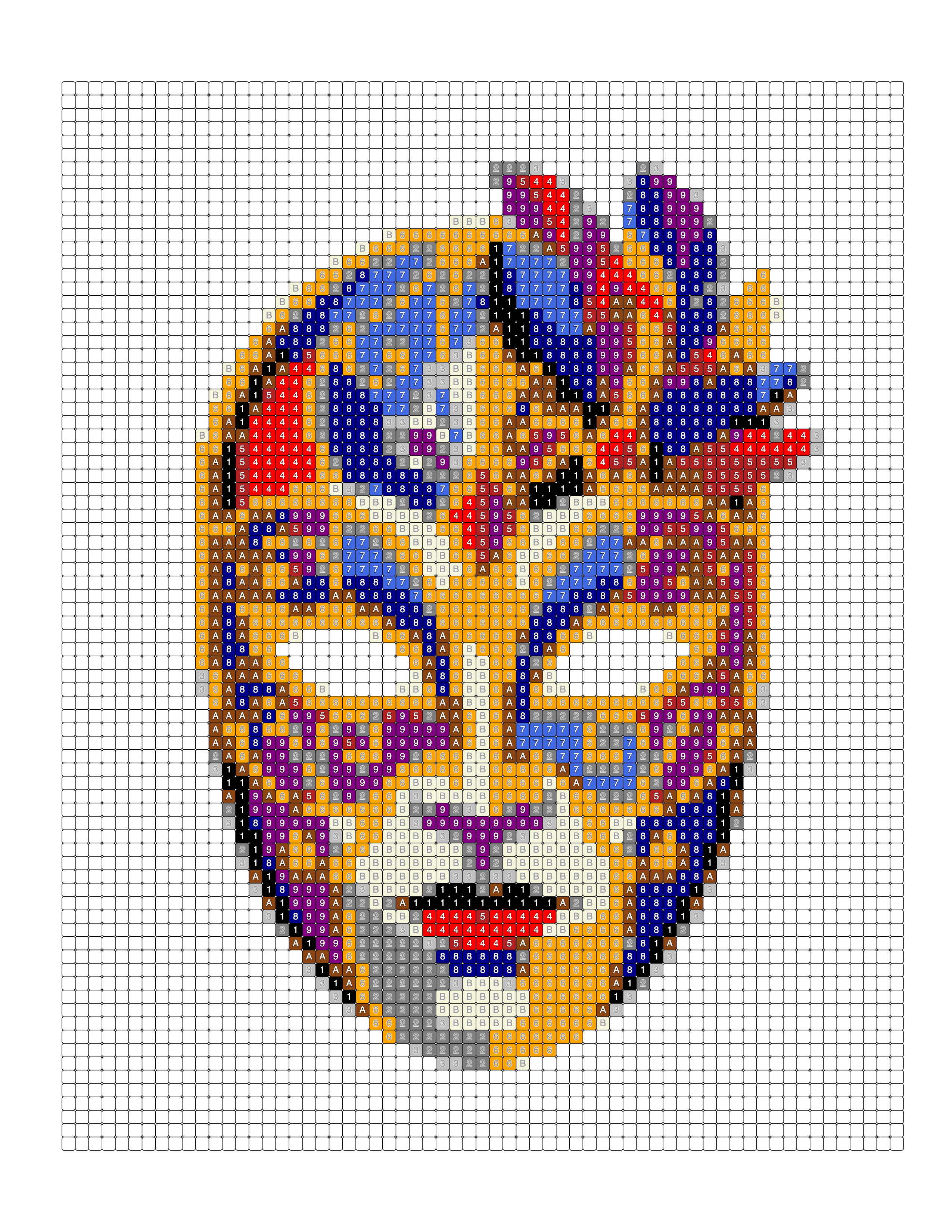
What it looks like: Square cells in strict rows and columns, all the same size.
Region size and feel: Even and predictable; the baseline the other patterns are judged against.
Best used for: Subjects built from straight horizontal and vertical edges, symmetrical subjects, and long sessions where easy position-tracking matters. See the carnival mask example.
Circle
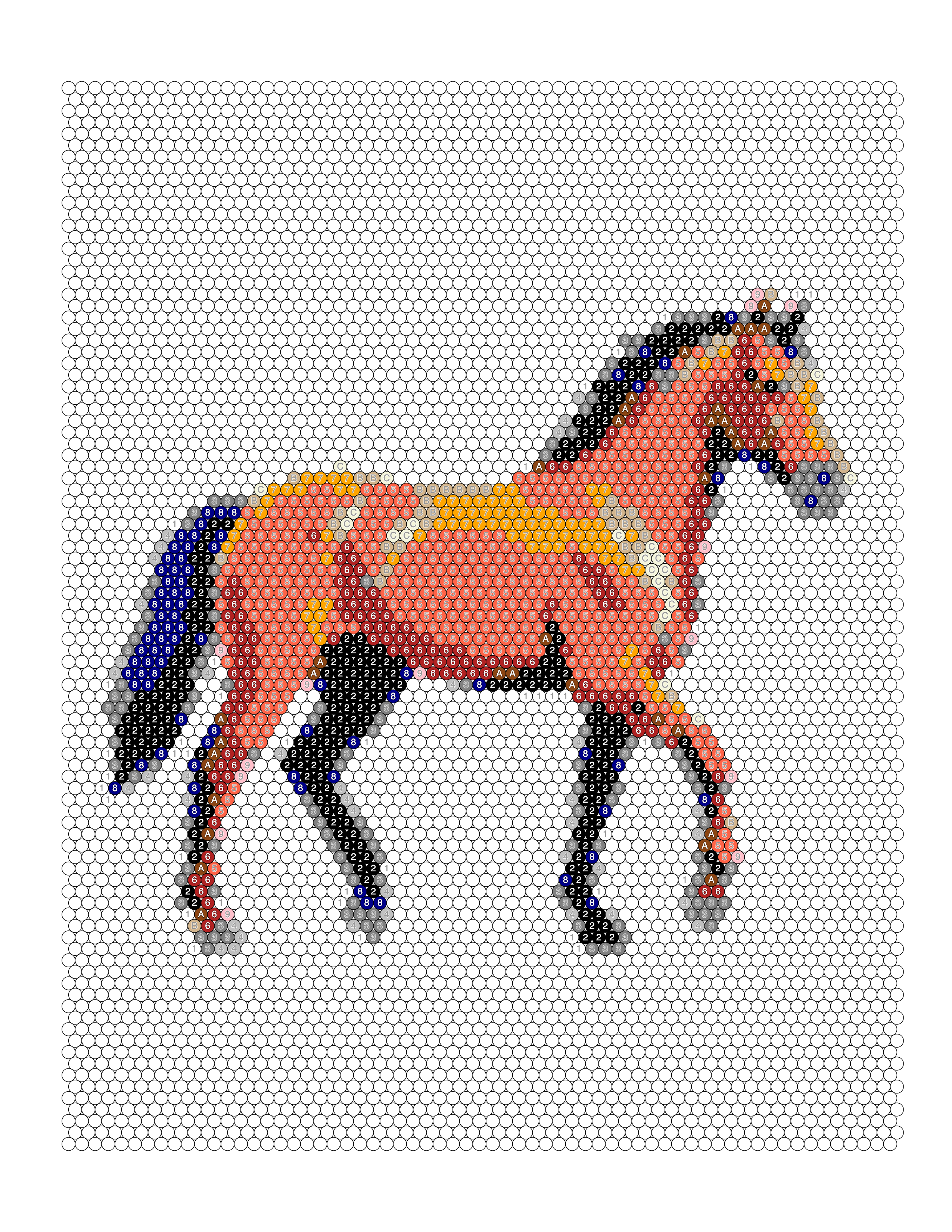
What it looks like: Round cells in staggered rows with gaps between them.
Region size and feel: The coarsest of the eight patterns, with the fewest regions; reads as dots of color on a ground.
Best used for: Subjects carried by a bold silhouette, and quick, graphic pages. See the horse example.
Diamond
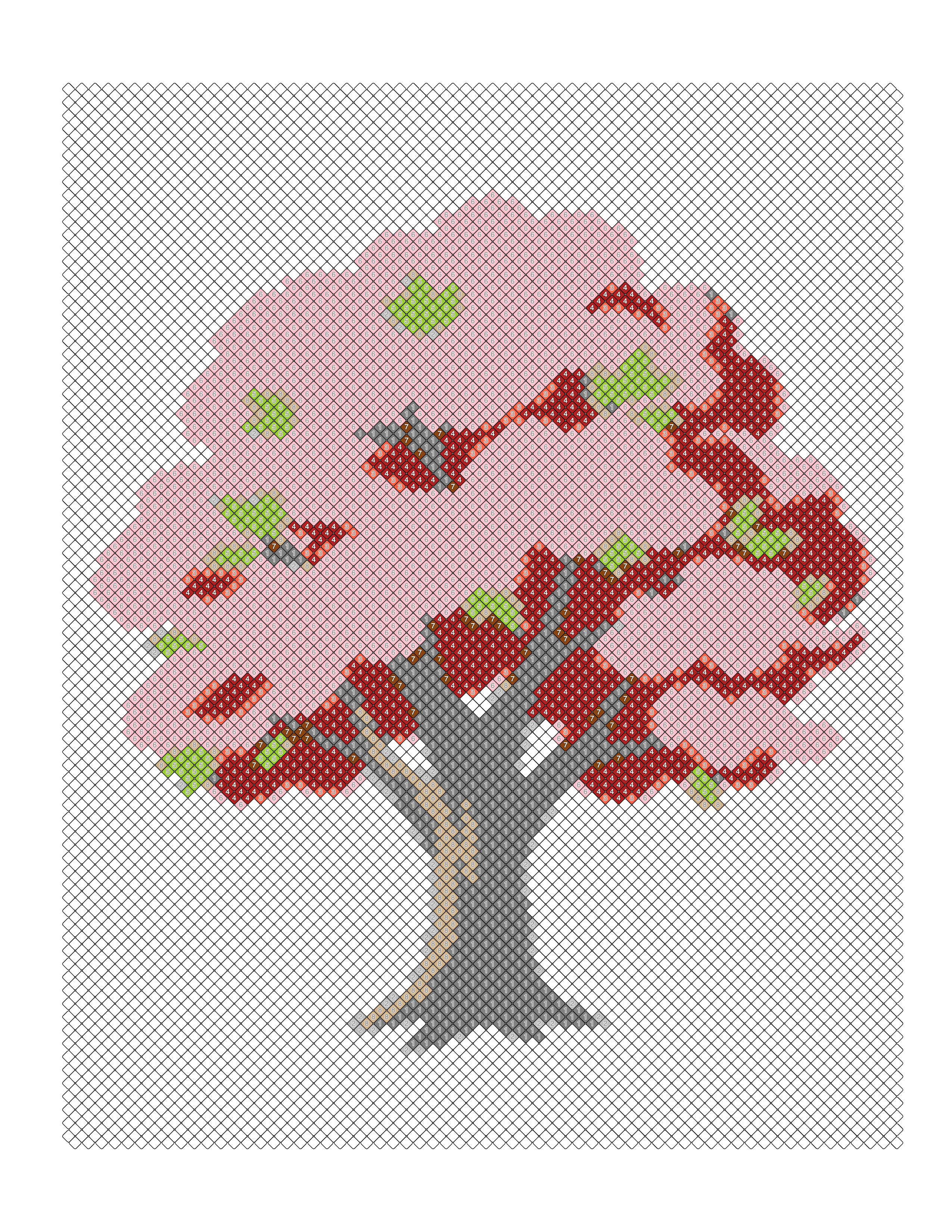
What it looks like: The square grid turned 45 degrees.
Region size and feel: Diagonal edges come through cleanly while horizontal and vertical ones step; strong directional rhythm.
Best used for: Subjects built from angled lines, such as branches. See the blossom tree example.
Hexagon
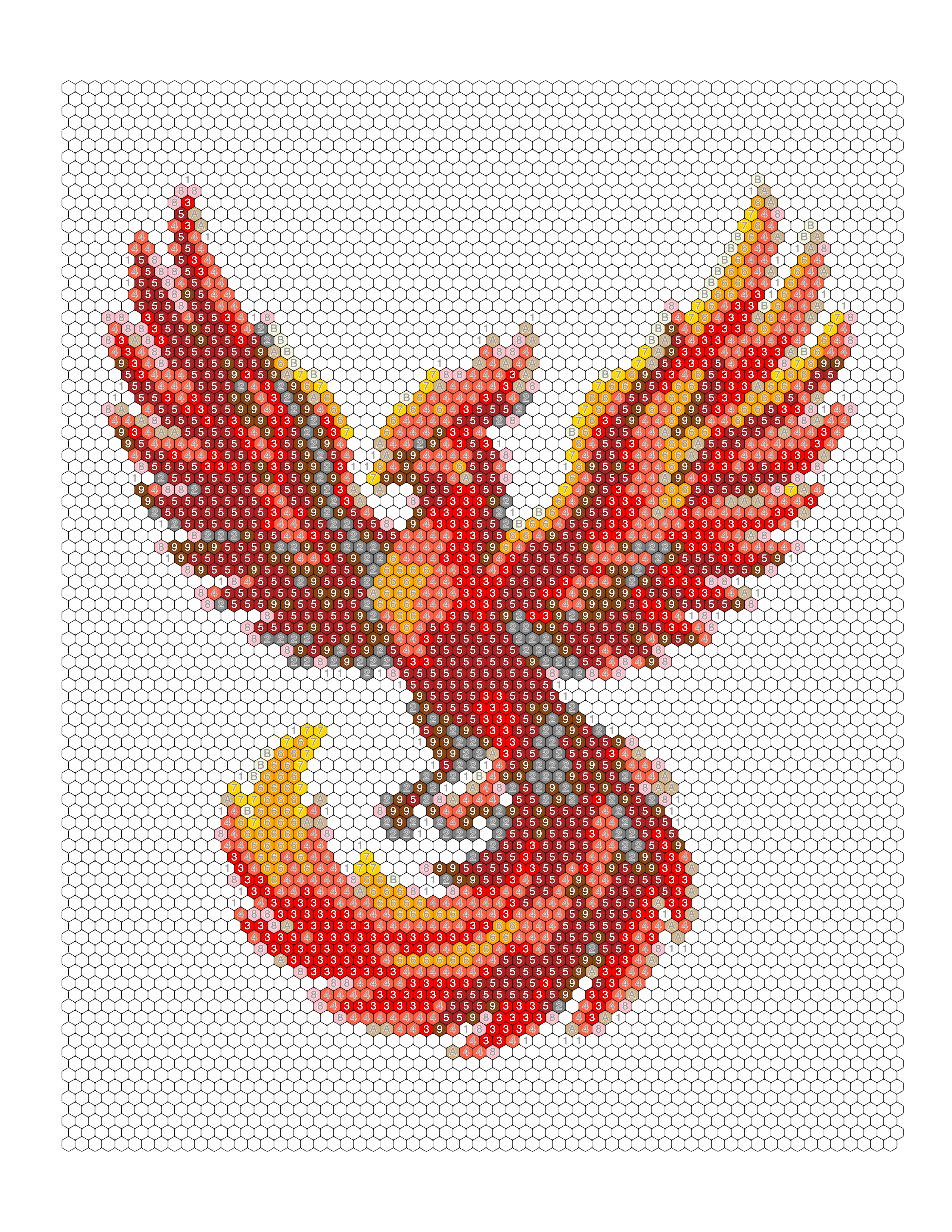
What it looks like: Hexagonal cells tiled without gaps, every cell with six neighbors.
Region size and feel: Smooth diagonals and curves; offset rows are slightly harder to track than rows and columns.
Best used for: Subjects whose key lines run at an angle, such as wings, tails and necks. See the phoenix example.
Puzzle
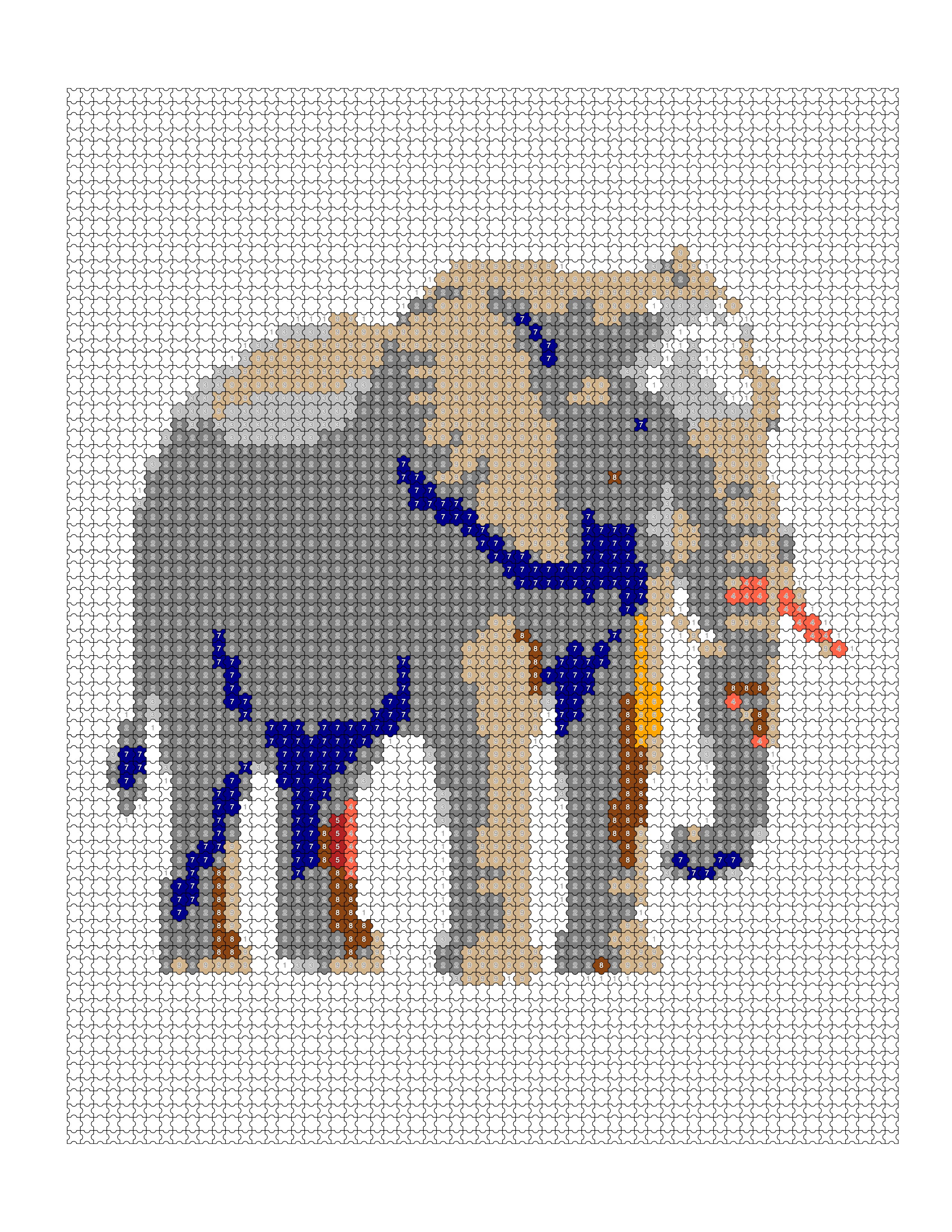
What it looks like: Interlocking tabs and blanks.
Region size and feel: Boundaries wander instead of running straight, which hides the grid; cells are harder to scan.
Best used for: Large, simple masses; a decorative, designed look. See the elephant example.
Islamic
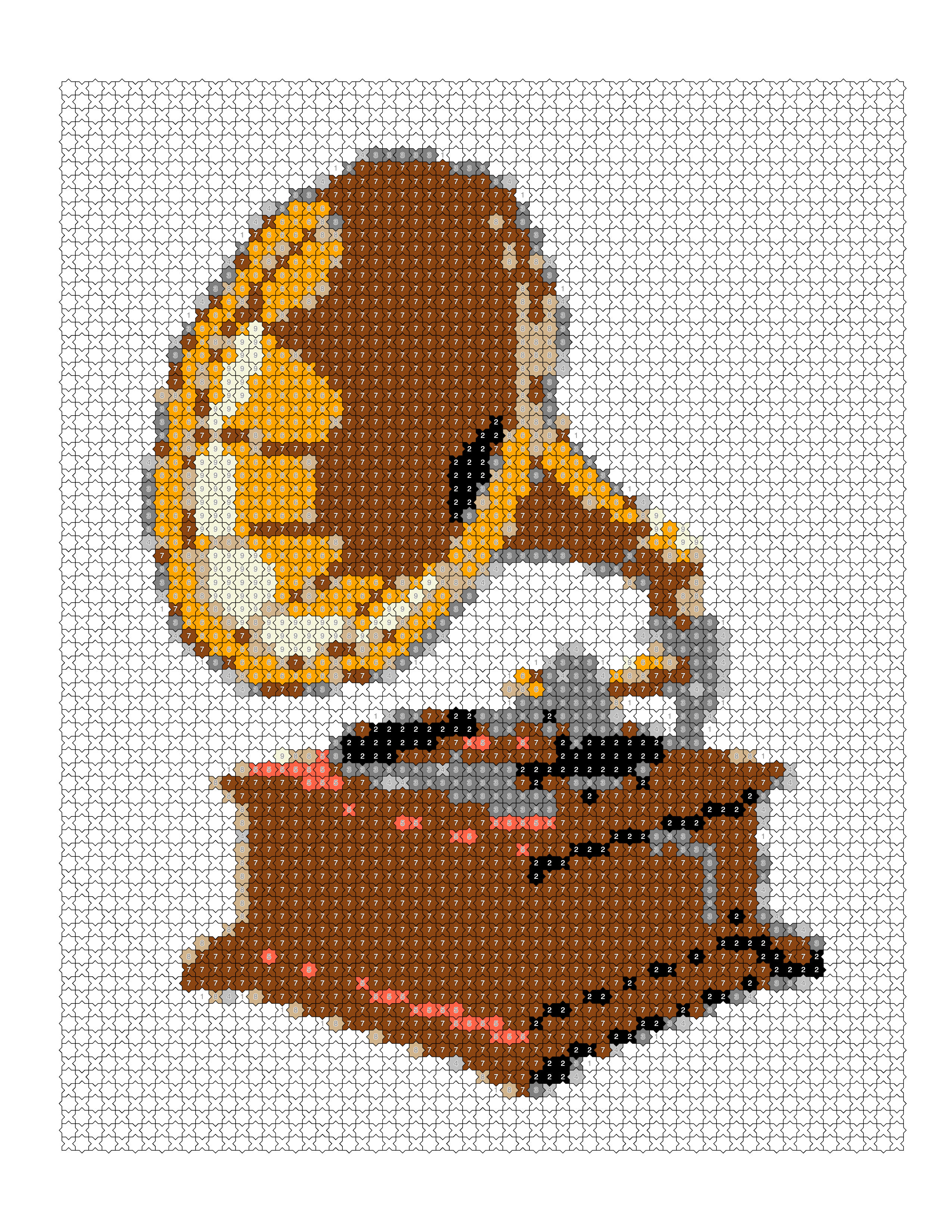
What it looks like: Interlocking stars and polygons on a strict lattice, with cells of several shapes and sizes.
Region size and feel: The most ornamental page in the set; the tiling is decorative in its own right.
Best used for: Bold, simple forms that can carry an ornamental tiling. See the gramophone example.
Fish Scale
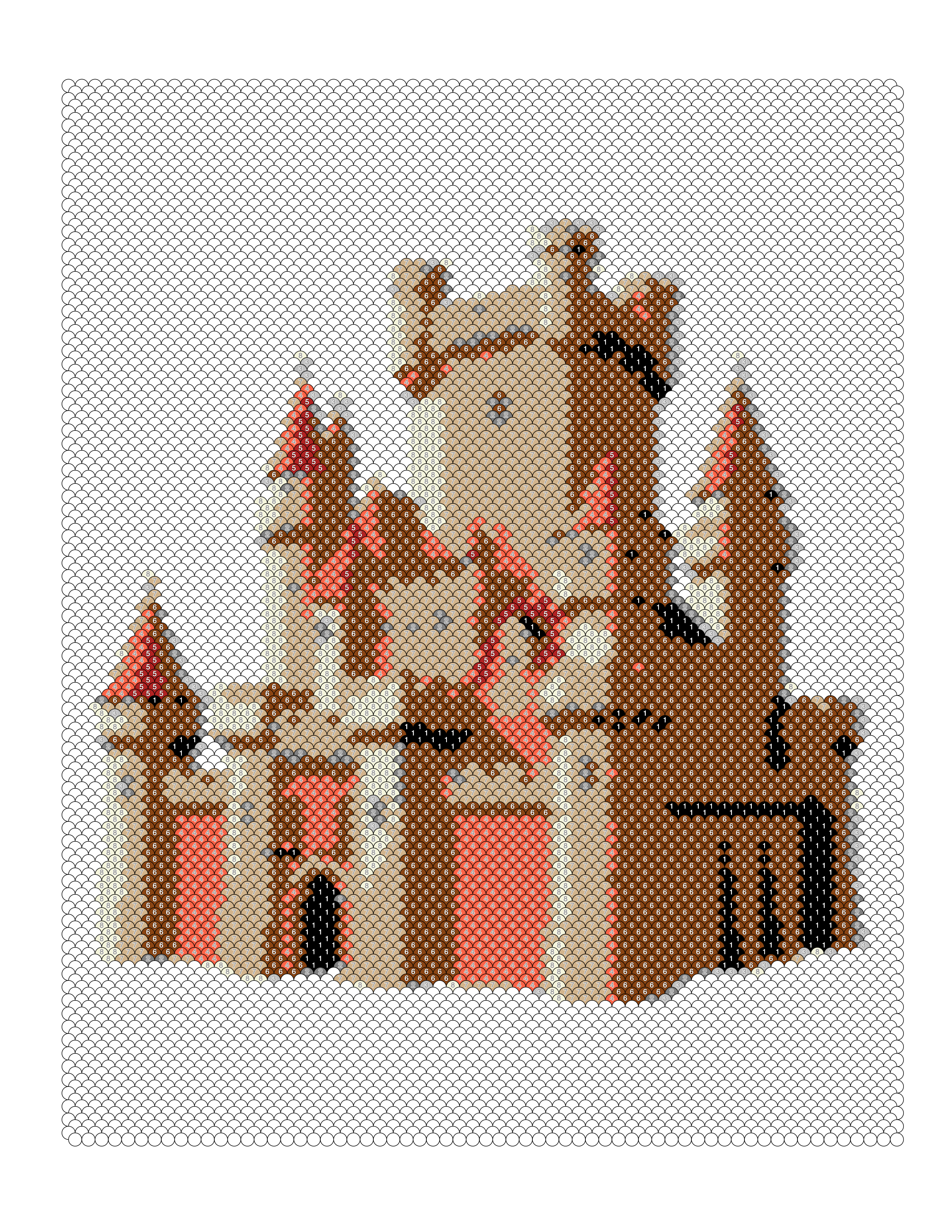
What it looks like: Overlapping curved cells in offset rows.
Region size and feel: The softest result of the eight, with no edge ever rendered as a straight step.
Best used for: Fur, feathers, water and other texture; weaker for crisp architecture. See the castle (the trade-off case) example.
Trapezoid
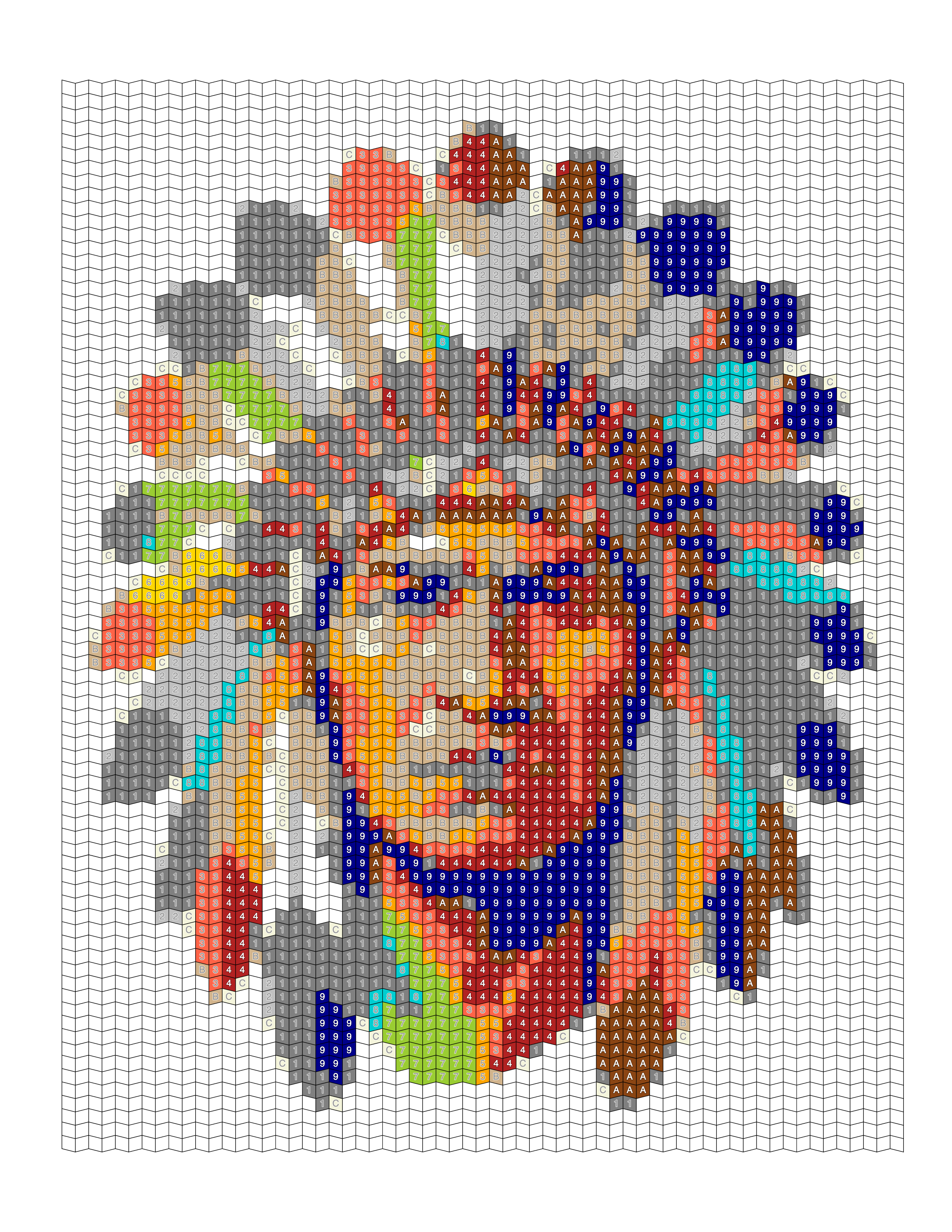
What it looks like: Interlocking rows of cells with two parallel and two sloping sides.
Region size and feel: The most regions of the eight patterns, read in bands, and the longest to complete.
Best used for: Subjects with the most detail to preserve, such as faces. See the feathered headdress portrait example.
The 3 Monochrome Mark Styles
The mark styles replace colors with ink marks. Instead of matching a number to a color, the colorist draws the mark shown in each cell, and the image emerges through tone alone. The whole page can be completed with a single pen or pencil, and the color-count setting does not apply to these styles.
Square Mark
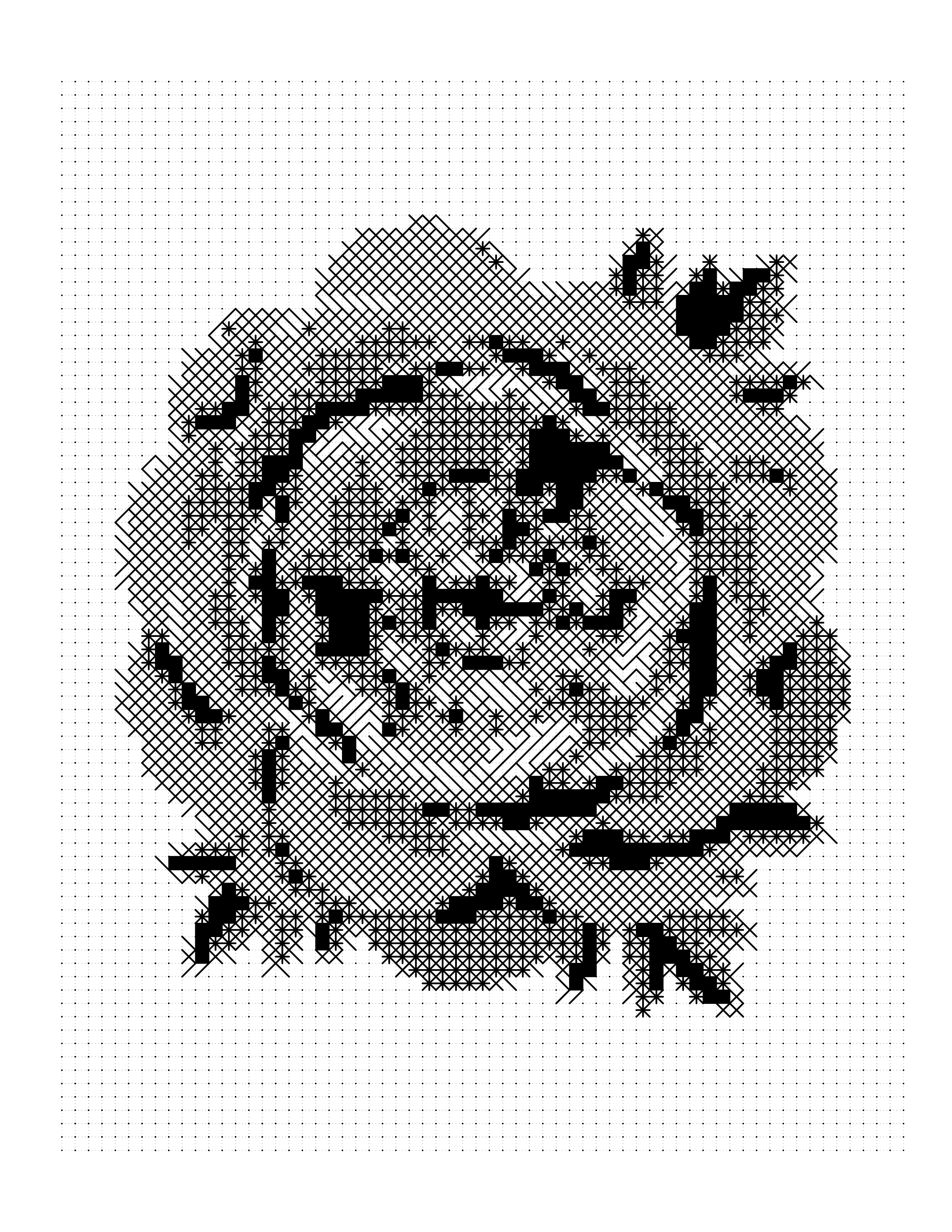
Square Mark puts ink marks in square cells. The lightest tone is a dot, followed by five marks of increasing density, ending in a solid square. It keeps the strict rows and columns of the Square pattern, so it suits the same subjects: straight edges and symmetrical forms. See the pink peony example.
Hexagon Mark
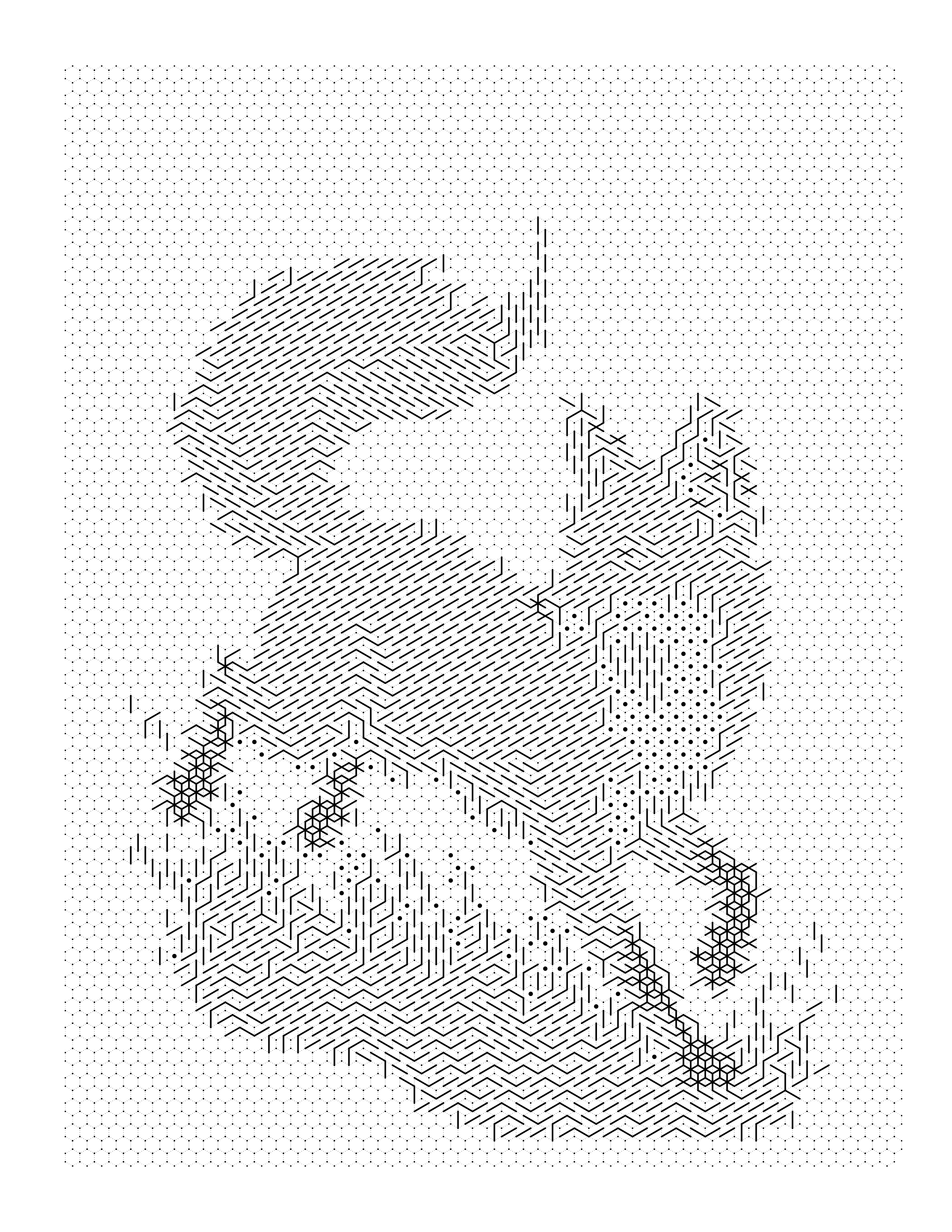
Hexagon Mark works the same way on honeycomb cells, with one more tone level than the other mark styles: a dot, then six marks, ending in a filled hexagon. The extra step grades light areas more finely, and the staggered rows follow curves more smoothly than a square grid, which is why it is the usual choice for flowers and animals. See the red fox example.
Dot Mark
Dot Mark uses round marks that change with tone: a dot for the lightest areas, then half-circles, up to a filled circle. Of the three it has the lightest, most open look. The gallery does not yet include a Dot Mark example, so there is no render to link here.
All three mark styles cost 2 credits per generation, against 1 credit for the color patterns; see pricing. For the full workflow of building a pen-only book, see monochrome color by number.
How to Choose a Pattern
Start from what is distinctive about your subject, then pick the pattern whose behavior matches it:
| If your subject is... | Try | Why |
|---|---|---|
| Carried by a bold silhouette | Circle | The fewest regions, and fine detail is lost anyway |
| Full of angled lines | Diamond or Hexagon | Both render diagonals more cleanly than a square grid |
| Fur, feathers or water | Fish Scale | The curved, overlapping cells read as surface texture |
| A face or other fine detail | Trapezoid | The most regions of the eight, so the most detail survives |
| Large simple shapes, decorative result wanted | Puzzle or Islamic | Both are ornamental and need big forms to work on |
| Symmetrical or made of straight edges | Square | Aligned rows keep the horizontals and verticals crisp |
| To be finished with one pen | Square Mark, Hexagon Mark or Dot Mark | They use marks instead of a palette |
If you are unsure, convert the same image in two or three patterns and compare the live previews before exporting. In the studio, Auto cycles through the patterns across pages, which gives a book some visual variety without choosing each page by hand.
Pattern, Cell Size and Color Count
Pattern is only one of three settings that decide how a page feels. Cell size sets how many cells fill the page, and color count sets how many different numbers appear on the key. A fine pattern at a small cell size gives the most detail and the longest session; a coarse pattern at a large cell size gives the quickest. The color-count guide covers the other two settings by age and skill level, and the mosaic coloring page maker lets you try every pattern on your own image.
Printable quality checklist
- Pick the pattern that suits your subject's dominant lines or texture
- Convert the same image in two or three patterns and compare the preview
- Choose a mark style if the page should be finished with one pen
- Set cell size and color count after the pattern
- Use one pattern across a whole book for consistency
- Check the gallery example for the pattern you are considering
Key takeaways
- There are 8 color patterns and 3 monochrome mark styles, 11 pattern options in total.
- Cell shape changes which edges render cleanly: squares favor horizontals and verticals, diamonds and hexagons favor diagonals, fish scales favor texture.
- Circle produces the fewest regions and Trapezoid the most, across the gallery examples.
- Mark styles replace the color key with ink marks, so one pen completes the page, and they cost 2 credits instead of 1.
- Preview the same image in two or three patterns before exporting.
Frequently asked questions
How many mosaic patterns does Mosaci Studio have?
11 pattern options in total: 8 color patterns (Square, Circle, Diamond, Hexagon, Puzzle, Islamic, Fish Scale and Trapezoid) and 3 monochrome mark styles (Square Mark, Hexagon Mark and Dot Mark).
What is the difference between color patterns and mark styles?
Color patterns number each cell and print a color key, so the page is colored with a palette. Mark styles draw an ink mark in each cell instead, so the whole page can be finished with a single pen or pencil. The color-count setting applies only to the color patterns.
Which pattern keeps the most detail?
Across the example pages in the gallery, the Trapezoid pattern produces the most regions of the eight color patterns, so it preserves the most detail and takes the longest to complete.
Which pattern is the quickest to color?
In the gallery examples the Circle pattern produces the fewest regions of the eight color patterns, which makes for a faster, more graphic page, at the cost of fine detail.
Which pattern is easiest to follow on a large page?
The Square pattern. Cells in strict rows and columns give an obvious way to track position, and the numbering is easy to follow. The trade-off is that diagonal edges step rather than flow.
Can I use different patterns on different pages of one book?
Yes. Each image can be set to its own pattern, and the Auto option cycles through the patterns across pages. Applying one pattern across a whole book keeps it consistent, which is usually the better choice for a themed set.
Do the mark styles cost more credits than the color patterns?
Yes. Mark styles cost 2 credits per generation and the color patterns cost 1 credit. Every account gets 10 free credits each month.
Which pattern should I use if I only want one pen?
Use one of the three mark styles: Square Mark, Hexagon Mark or Dot Mark. They turn tone into ink marks, so no colored pencils or markers are needed.
Related tools
Written by
Mosaci Studio TeamThe team behind Mosaci Studio
Mosaci Studio is built to help KDP publishers, Etsy sellers, and hobby artists turn photos into print-ready coloring pages without any design experience.
Published Oct 6, 2026