
Quick answer
It is tempting to treat these two products as the same thing with different logos. They are not, and the difference is not quality — it is what each one is built to start from.
ColorBliss is a coloring-page creation platform built around AI generation, with photo conversion as one of several input methods. Mosaci Studio is a photo conversion tool: you supply the image, and it reduces it into a printable page. Both can turn a photograph into something you can color. They arrive there by different routes, and those routes produce different kinds of output, different amounts of control, and different pricing shapes.
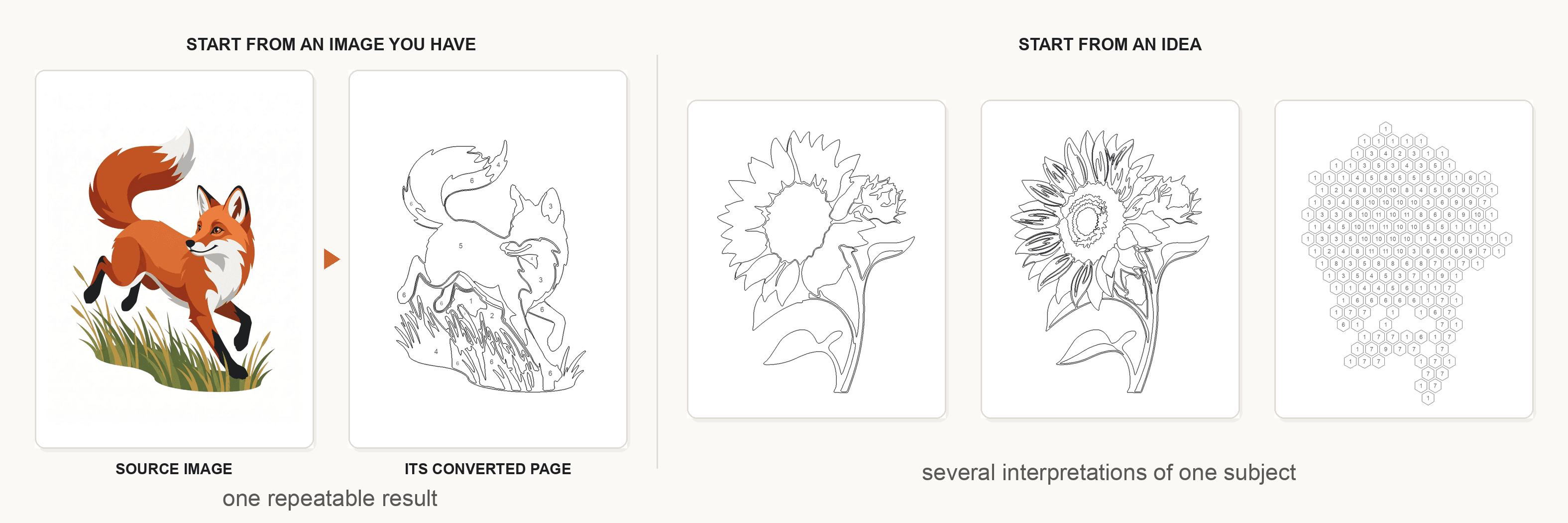
So the useful question is not which is better. It is which starting point matches yours: an image you already have and want to keep recognizable, or an idea you want a tool to draw for you.
Mosaci vs ColorBliss at a Glance
Everything below comes from each product's own current documentation. Rows where a capability is not documented say so rather than guessing.
| Mosaci | ColorBliss | |
|---|---|---|
| Primary input | An uploaded photo | A text prompt, an uploaded photo, or a sketch |
| Generates new artwork from a description | No | Yes, across 20+ documented styles |
| Outline-only coloring page from a photo | No; the output is a numbered mosaic page | Yes, with quality settings, on the Hobby plan and above |
| Color-by-number output with numbered cells | Yes, with a matching color key | Not a documented feature |
| Mosaic-cell conversion | Yes, 10 pattern options | Not a documented feature |
| Style range | Conversion styles rather than art styles | 20+ art styles, plus custom styles from your own reference images |
| Colouring a finished page in-app | Not offered | Yes, Magic Color across several media styles |
| Batch work | Bulk upload of photo folders | Bulk photo converter, up to 50 photos; bulk generation on Artist and above |
| Book output | Print-ready PDF at KDP dimensions | Coloring book generator, up to 50 pages, print-ready PDF |
| Print resolution | Print-ready PDF export | 300 DPI via one-click or bulk upscaling |
| Pricing shape | Pay-per-use credits, 10 free monthly, no subscription | Monthly plans plus one-time credit packs; free credits on new accounts |
| Commercial use | Permitted for generated outputs under the current licence | Included from the Artist plan upward |
What Is Mosaci?
Mosaci is a browser-based converter with a deliberately narrow scope: photographs in, printable pages out. There is no prompt box, because there is nothing to describe — the image is the input.
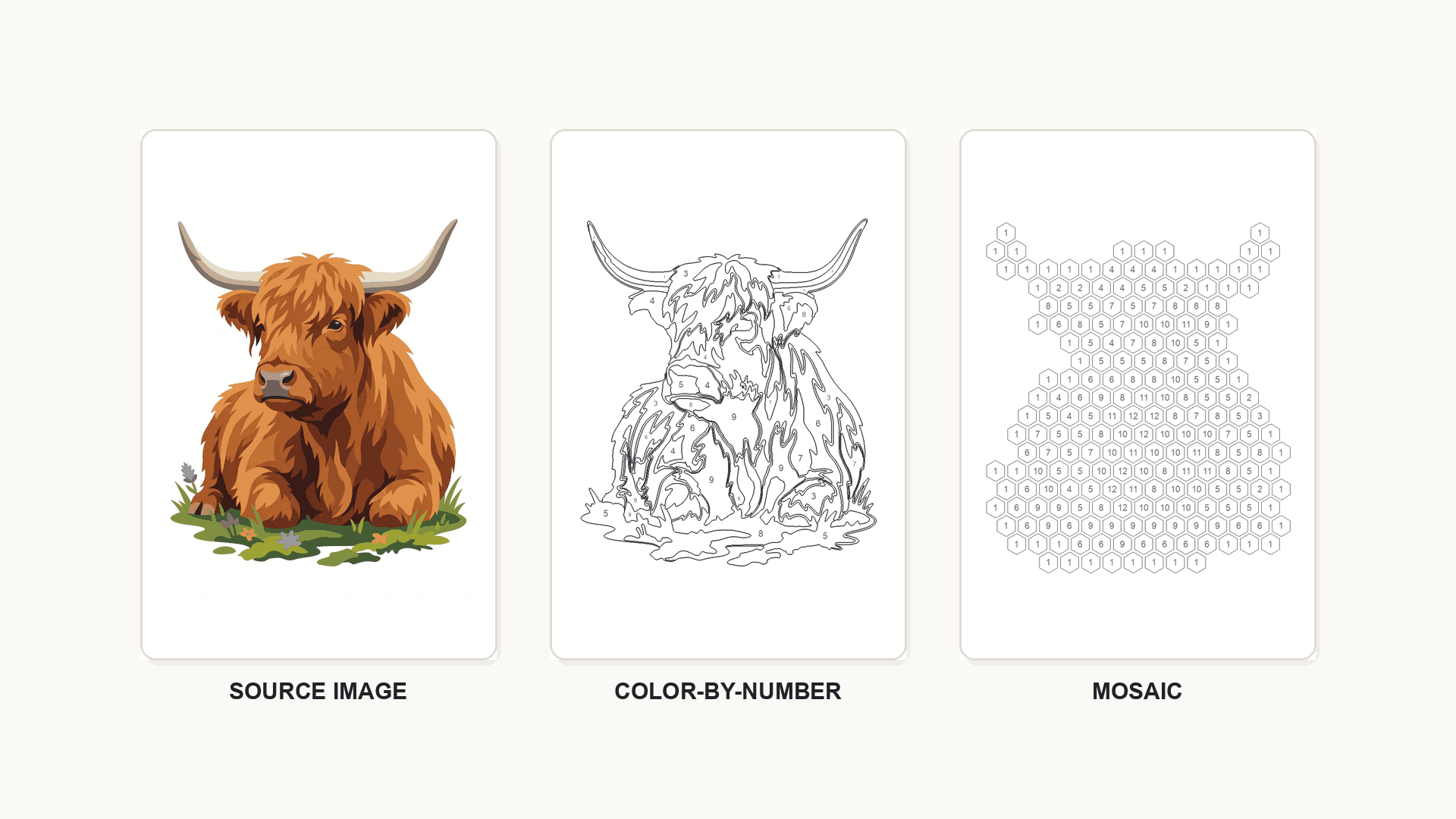
It produces a numbered mosaic page from the upload: the image is reduced to a limited palette and rebuilt from uniform cells — hexagonal, square, diamond and others — with a number in each cell and a matching color key. The same upload also gives a filled color-by-number reference so you can see the finished result, and the monochrome mark styles replace the color key with ink marks. It does not draw an outline-only coloring page.
Control is exposed as settings rather than prompts: colour count, grid size, and page size, with KDP-compatible dimensions and a colour key included in the export. Whole folders of photos can be uploaded at once. Pricing is pay-per-use — ten free credits monthly, credit packs when you need more, no subscription — and the current licence permits printing and selling what you generate, including on KDP and Etsy.
The trade-off is the obvious one: if you have no photograph, Mosaci has nothing to work with.
What Is ColorBliss?
ColorBliss is a coloring-page platform built primarily around generation. You describe a page and it draws one, in any of 20-plus documented styles — simple, intricate, cartoon, zentangle, manga, mandala, floral, minimalist and others — and you can define custom styles from your own reference images.
Around that sits a real toolkit. Photo conversion turns an uploaded image into line art, with quality settings and a bulk converter that handles up to 50 photos. Drawings can be cleaned into finished pages. Word art produces lettering pages. Editing includes background removal, inpainting, touch-ups, frames, aspect-ratio changes and Magic Color, which colors a finished page inside the app. Consistent characters keep one character stable across a book. Pages upscale to 300 DPI in one click or in bulk, and export as PNG or PDF.
Two structural points matter when comparing. Photo and drawing conversion sit on the Hobby plan and above, not the entry tier; commercial rights arrive with the Artist plan. Plans and credit packs both exist, and the details move — check the pricing page rather than any article's snapshot, this one included.
Creating Coloring Pages From an Existing Photo
Both products do this. The workflows differ in a way that decides which suits your photo.
Mosaci measures the image. It groups pixels into regions, merges the ones too small to be useful, and draws the boundaries. Because the output is derived arithmetically from your file, the same photo and the same settings give the same page every time — and the resemblance is structural rather than interpretive. What you tune is the reduction: how many colours, how fine the regions.
ColorBliss converts through its generation pipeline, with quality settings governing the result and its documented styles shaping how the page looks. That opens a door Mosaci does not have: the same photo can come back as a cartoon, a zentangle, or a minimalist line drawing. What you give up is exact repeatability — a styled interpretation is an interpretation.
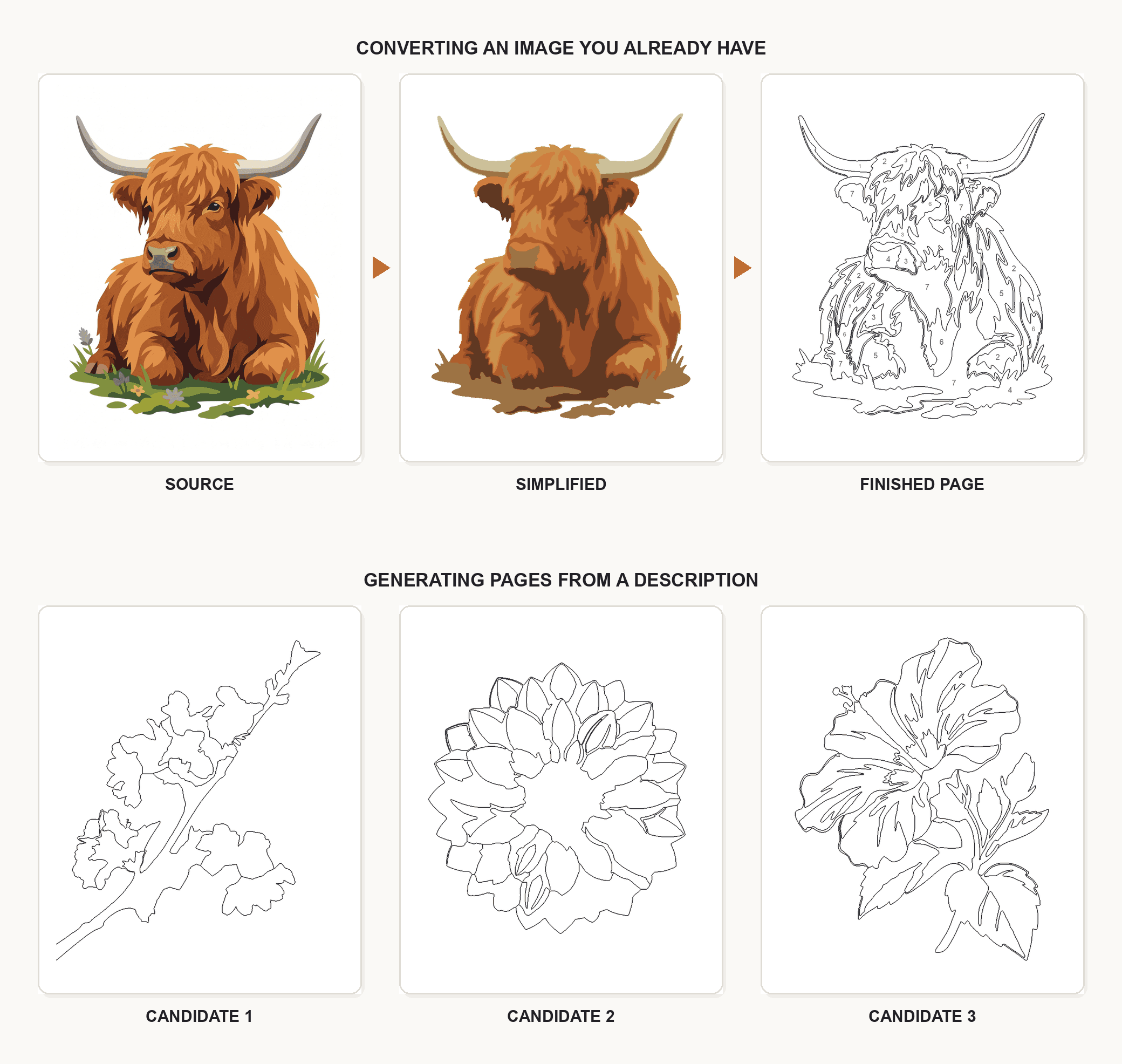
Preparation differs too. Because Mosaci's output follows the image arithmetically, anything you fix before uploading — cropping tighter, removing a distracting background, raising contrast — shows up directly in the page. ColorBliss can absorb some of that after the fact instead: background removal, inpainting and touch-ups are documented editing tools, so a flawed conversion can be repaired rather than re-shot. Two different philosophies, and which suits you depends on whether you would rather prepare the input or fix the output.
Both also scale past a single image. ColorBliss's bulk photo converter handles up to 50 photos; Mosaci accepts whole folders. If you are converting a holiday's worth of pictures, neither leaves you clicking one at a time.
Neither approach rescues a bad source file. A dim, cluttered, low-contrast photo produces a poor page in both, which is why preparing the photo first improves results more than switching products does. If you want the mechanics of conversion itself rather than the comparison, how to turn a picture into a coloring page online covers the process.
Generated Pages and Converted Pages Are Not the Same Product
This is the distinction most comparisons blur, and it decides more than any feature list.
A converted page is a reduction of a specific photograph. Its value is that it is your grandmother, your dog, the house you grew up in. Success is measured by recognition: someone who knows the subject should see them in the outlines.
A generated page is new artwork made to a description. Its value is that it can be anything — a dinosaur birthday theme, forty woodland scenes in a consistent style, a mandala nobody has drawn before. Success is measured by appeal, and personal likeness is not part of the brief.
Each fails at the other's job. Ask a generator for a faithful portrait and you get a plausible stranger; ask a converter for a themed activity book and you get nothing, because there is no photograph to convert. How AI converts images into line art explains why the two behave so differently underneath.
The practical consequence: if your project starts with people or pets you know, conversion fidelity matters most. If it starts with a theme, generation breadth matters most. Many people need both at different times, and there is no rule against using two tools.
Color-by-Number and Structured Pages
This is the clearest functional divergence between the two.
Mosaci produces color-by-number output directly: numbered regions, a matching colour key, and control over how many colours the page uses. That structure is the point of the format — the numbers guide the colouring rather than leaving every choice open. Photo to Color by Number: The Complete Guide covers how the conversion works, and how many colours a page should have covers choosing the count.
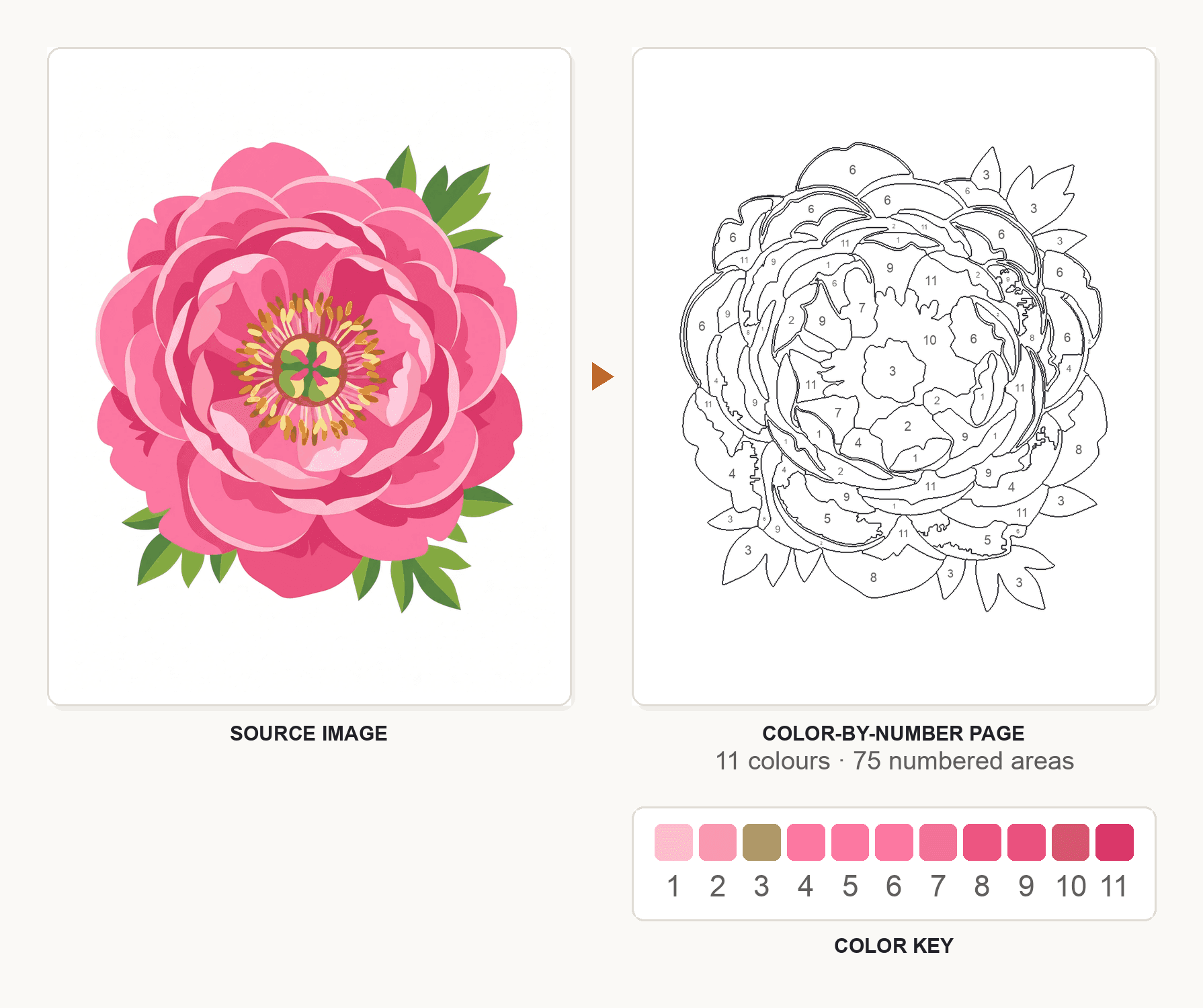
ColorBliss's documentation describes clean black-and-white outline pages, editing tools, and Magic Color for colouring a finished page in-app. Numbered color-by-number output is not among its documented features. That is a scope difference rather than a shortcoming — ColorBliss is not positioned as a color-by-number tool, and the absence only matters if numbered pages are what you came for.
Worth noting for anyone weighing this: results depend heavily on the source. What makes a good photo for color-by-number conversion is the difference between a template that works and one that fragments, whichever tool produces it.
Mosaic-Style Projects
Mosaic conversion rebuilds a photo from uniform tiles rather than tracing its edges, which suits images that region-based conversion struggles with — busy textures, foliage, crowds. Mosaci offers 8 color mosaic patterns and 2 monochrome mark styles, with adjustable cell size and automatic numbering. How mosaic coloring works explains the format, and how to turn a photo into a mosaic coloring page covers the conversion.
ColorBliss does not document a mosaic or tiled-grid conversion. Its style range is illustrative — zentangle, doodle, mandala and similar — which produces pattern-dense pages of a different kind: drawn ornament rather than a measured grid. If you want the geometric structure specifically, that is a Mosaci workflow. If you want dense decorative line work, ColorBliss's styles cover it.
Which Gives You More Control?
Control means different things in the two products, and more of it is not automatically better.
ColorBliss's control is directional: prompt wording, a choice among 20-plus styles, custom styles built from your own references, quality settings on photo conversion, then editing after the fact — inpainting, background removal, touch-ups, frames, aspect ratio. You steer the result and refine it, which is powerful for exploration and less exact when you need one specific outcome.
Mosaci's control is parametric: colour count, region detail, grid style and size, page size. Fewer decisions, each one deterministic. Change a number and you know what changes.
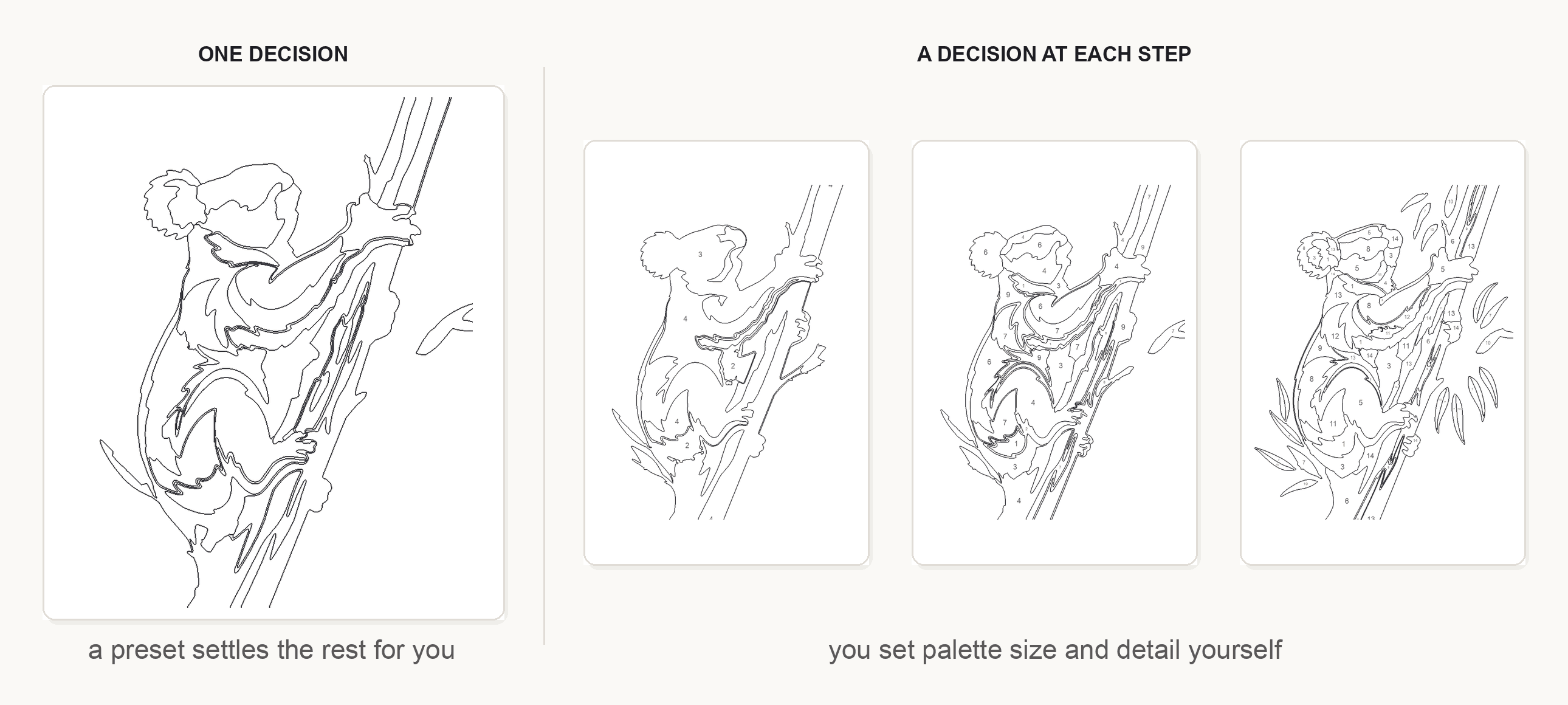
Which you prefer is genuinely a matter of temperament and task. Someone making one page for a party wants fewer decisions. Someone producing forty pages that must match wants settings they can hold constant. Someone exploring what a photo could become wants to try 8 styles and pick one. None of those people is wrong.
Ease of Use and Learning Curve
Neither product is difficult, but they ask different things of a beginner.
Mosaci asks you to make numeric decisions: how many colours, how large the grid, what page size. Nothing needs to be described in words, and there is no prompt to get wrong — but the settings do have to be understood before the output stops surprising you. Someone who has never thought about palette size will get a workable page from the defaults and a much better one after reading what determines difficulty.
ColorBliss asks you to describe or choose. Picking from 20-plus named styles is easier for most people than reasoning about region counts, and prompt writing is a skill that rewards practice — the same request phrased two ways gives two different pages. The editing tools soften the learning curve further, because a near-miss can be corrected rather than regenerated from scratch.
Roughly: Mosaci is easier if you know what you want and harder if you do not; ColorBliss is easier to start and takes longer to master.
Print and Coloring Book Workflows
Both products are aimed at paper, and both support multi-page work — but through different routes.
ColorBliss upscales to 300 DPI with one click or in bulk, exports PNG and PDF, and its coloring book generator assembles up to 50 pages into a print-ready PDF with custom page order and title pages, drawing on prompts, photos and word art alike. Bulk generation sits on the Artist plan; that is also where commercial rights begin.
Mosaci exports print-ready PDFs at KDP-compatible dimensions with the colour key included, and accepts whole folders of photos at once — the workflow assumes a book made of many conversions rather than many generations. Its current licence permits selling the output.
For anything you intend to publish, check the live terms of whichever tool you use rather than a summary. Licensing changes, and it is tier-dependent on ColorBliss. If you are heading for a book, creating a coloring book from photos and publishing on Amazon KDP cover what the files have to satisfy at the other end.
Mosaci May Be the Better Fit If You
- Start from photographs you care about and want the subject to stay recognizable
- Want numbered color-by-number pages with a colour key, not outline-only pages
- Want mosaic-cell conversions with adjustable grid styles
- Prefer deterministic settings you can hold constant across many pages
- Want KDP-sized print-ready PDFs from a folder of photos
- Prefer paying per use rather than holding a subscription
ColorBliss May Be the Better Fit If You
- Want to create pages from a description rather than from a photograph
- Want breadth of art styles, including styles built from your own reference images
- Want to colour a finished page in-app rather than only printing it
- Want editing after generation — background removal, inpainting, touch-ups, frames
- Want consistent characters running across a whole book
- Want prompts, photos and word art assembled into one book in a single place
- Are already working monthly and will use a subscription's credits
Our Verdict
There is no winner here, because the two products answer different questions.
Choose Mosaci if your starting point is a photograph and the finished page has to look like it — particularly if you want numbered color-by-number or mosaic output, or you are producing many print-ready pages with consistent settings.
Choose ColorBliss if your starting point is an idea — a theme, a character, a style — or if you want a wide style range, in-app colouring and post-generation editing around your pages.
If your project is genuinely both, using both is a reasonable answer rather than a cop-out. A personalised photo page and a themed generated page are different products for the reader colouring them, and no single tool is currently best at both.
Some concrete cases, since abstractions only go so far. A memorial book of family photographs is a conversion job, and the numbered format gives people something to do with it — Mosaci. A themed activity book for a children's party is a generation job, and needs style consistency across pages more than it needs likeness — ColorBliss. A pet portrait for a birthday card could go either way: convert it if the point is that it is that dog, generate it if the point is a charming cartoon. An Etsy shop selling personalised pages leans toward conversion; an Etsy shop selling themed printable packs leans toward generation.
The one caveat that applies either way: for anything you plan to sell, confirm the current licensing on the product's own terms page, at the tier you are actually on.
Conclusion
The honest summary is that Mosaci and ColorBliss are not competing for the same job. One reduces an image you already have; the other draws one you describe. Both print, both handle multiple pages, both charge for volume — but the page that comes out the other end is answering a different question.
So decide by your starting point rather than by feature count. If there is a photograph at the centre of your project and its likeness is the point, the conversion route is the one to test first — and you can convert a photo in Mosaci and see the result on paper before committing to anything.
Printable quality checklist
- Decide whether your project starts from a photograph or from an idea
- Check whether numbered color-by-number or mosaic output is part of what you need
- Confirm which plan tier includes the feature you actually want to use
- Test your own photo in either tool before committing to a subscription or credits
- Print one page at final size rather than judging it on screen
- Verify the current licensing terms at your tier before selling anything
Key takeaways
- Mosaci starts from a photo you supply; ColorBliss starts from a prompt, a photo, or a sketch.
- Numbered color-by-number output and mosaic-cell conversion are Mosaci workflows and are not documented ColorBliss features.
- ColorBliss offers 20+ art styles, custom styles from reference images, in-app coloring and post-generation editing that Mosaci does not.
- Mosaci's control is parametric and repeatable; ColorBliss's is directional and open to reinterpretation.
- Both print and both handle multi-page books — but ColorBliss ties photo conversion and commercial rights to specific plan tiers, so check its current pricing page.
Frequently asked questions
Is Mosaci better than ColorBliss for turning photos into coloring pages?
Not universally — it depends on what you want the page to be. Mosaci reduces the photo arithmetically, so the same photo and settings give the same page and the subject stays structurally faithful. ColorBliss converts photos through its generation pipeline with quality settings and its documented art styles, so the same photo can be returned as a cartoon, a zentangle or a minimalist drawing. If likeness matters most, conversion is the safer route; if you want a styled interpretation, ColorBliss offers more range.
Can both Mosaci and ColorBliss create coloring pages from photos?
Yes. Both accept an uploaded photograph and both offer batch handling — ColorBliss documents a bulk photo converter for up to 50 photos, and Mosaci accepts whole folders. One difference worth knowing before you sign up: on ColorBliss, photo and drawing conversion is documented as a Hobby-plan feature and above, not part of the entry tier.
Which is better for color-by-number projects?
Mosaci, on current documentation. It produces numbered cells with a matching color key and lets you set the number of colors (4 to 23). ColorBliss documents clean black-and-white outline pages plus editing and in-app coloring tools, but numbered color-by-number output is not among its listed features. That reflects different product scopes rather than a flaw.
Which is better for personalized coloring pages?
For pages of a specific person, pet or place, a measured conversion holds the likeness more reliably, which favours Mosaci. ColorBliss is strong on a different kind of personalization: consistent characters across a book, custom styles built from your own reference images, and word art using names or quotes. Both are personal — one to a photograph, the other to a theme.
Which is easier for beginners?
ColorBliss is usually easier to start, because choosing a named style is more intuitive than reasoning about palette size and region detail. Mosaci is easier to get a predictable result from once you know what you want, because the same settings always produce the same page. Neither requires design experience.
Which is better for printable coloring pages and books?
Both are aimed at print. ColorBliss upscales to 300 DPI, exports PNG and PDF, and assembles up to 50 pages into a book with title pages and custom ordering. Mosaci exports print-ready PDFs at KDP-compatible dimensions with the color key included and converts folders of photos in bulk. If you intend to sell the result, check the current licensing at your tier — on ColorBliss commercial rights begin with the Artist plan, and Mosaci's terms are on its own licence page.
Related tools
Photo to Coloring Page Converter
Convert an image into a numbered mosaic coloring page and export a print-ready PDF.
Color-by-Number Generator
Turn the same photo into numbered regions with a matching color key.
Mosaic Coloring Page Maker
Rebuild a photo from numbered mosaic cells, with 8 color mosaic patterns and 2 monochrome mark styles.
Written by
Mosaci Studio TeamThe team behind Mosaci Studio
Mosaci Studio is built to help KDP publishers, Etsy sellers, and hobby artists turn photos into print-ready coloring pages without any design experience.
Published Sep 7, 2026 · Updated Oct 6, 2026