
Quick answer
People go looking for a ColorBliss alternative for ordinary reasons. They started with a photograph rather than an idea and want the finished page to still look like that photograph. They want numbered cells instead of an open outline. They want a mosaic grid. They want to pay for the twelve pages they need rather than a monthly allowance. None of that means anything is wrong with ColorBliss — it means the project has a shape that a different tool fits better.
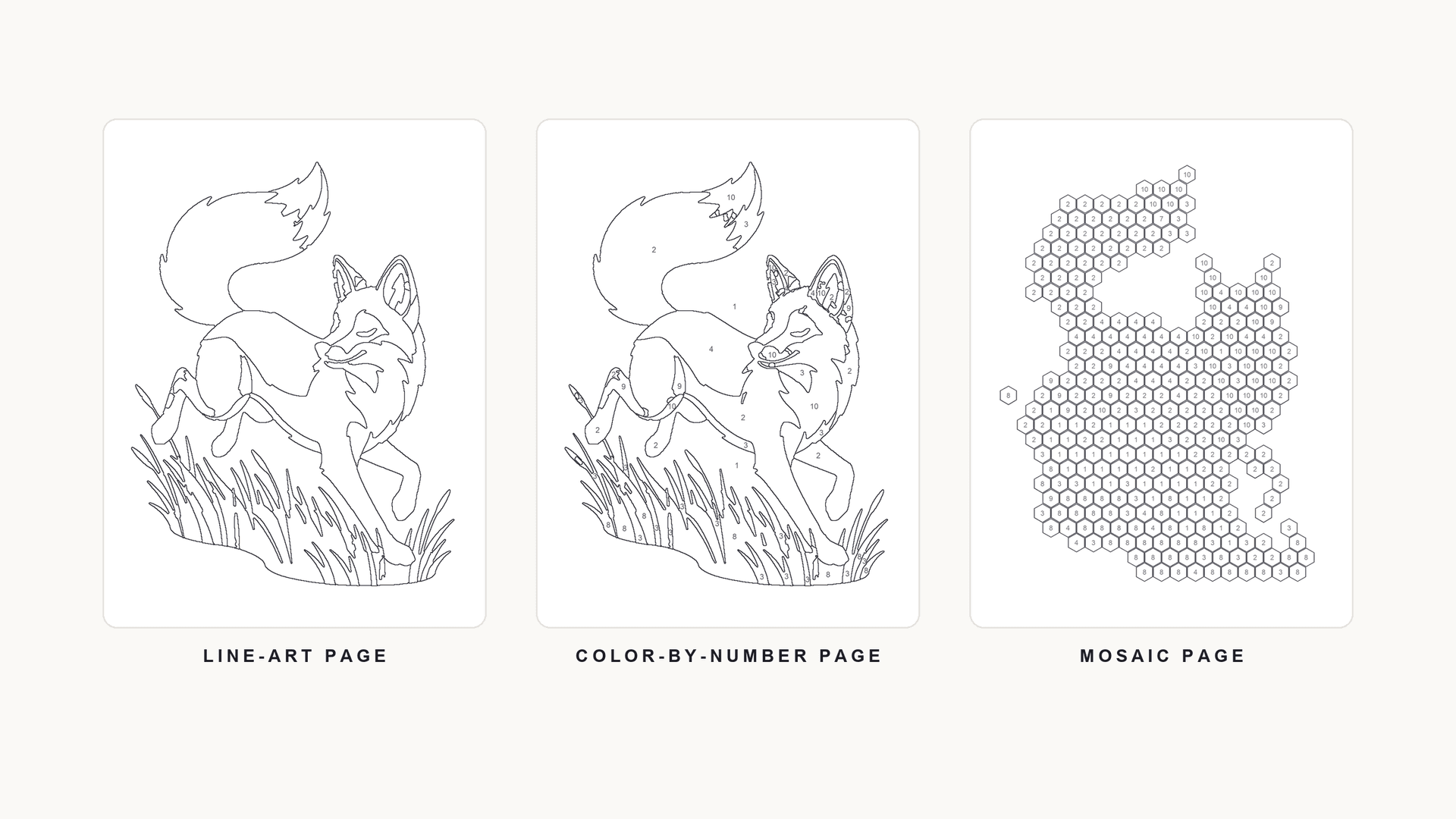
ColorBliss is built primarily around generation. You describe a page and it draws one, across a documented set of art styles, with photo and drawing conversion, in-app coloring, editing tools and a coloring book generator built around that core. That shape is excellent when the subject is still an idea. It is less obviously the right shape when the subject is already sitting in your camera roll, or when the output you want is a numbered page rather than an outline.
This guide compares six alternatives by the workflow each one is actually built for. There is no universal winner here, and picking one is mostly a question of where your project starts.
What Should You Look for in a ColorBliss Alternative?
Before comparing products, it helps to know which of these questions actually applies to you. Most disappointment with a coloring page tool comes from a mismatch on one of the first three.
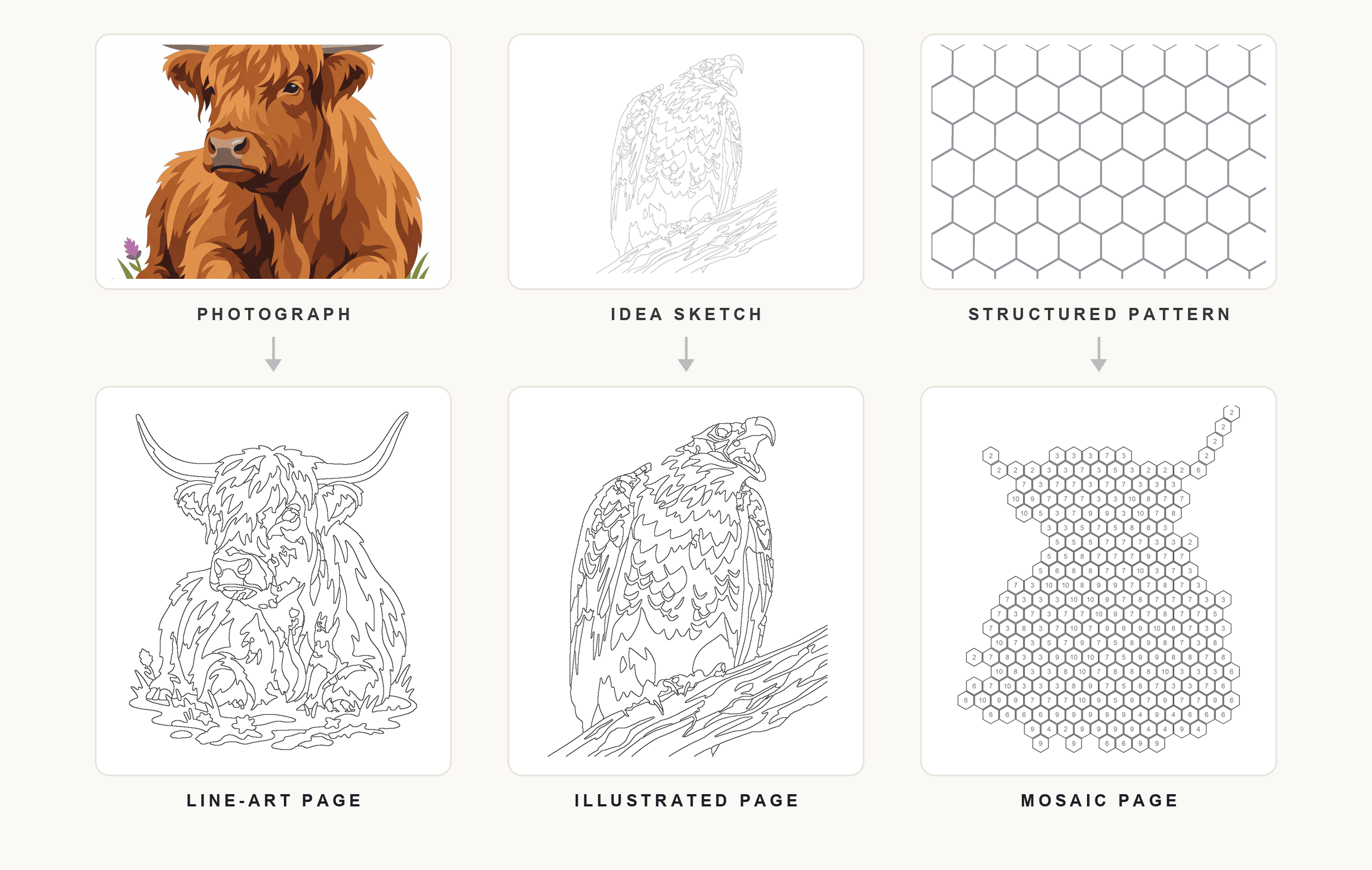
Where does the page start? A prompt, an uploaded photo, or a sketch. This is the biggest fork, and it decides most of the rest.
Does the subject need to survive? If you are converting a photo of a specific dog or a specific wedding, the page has to stay recognisable. Generation does not preserve a subject it has never seen; conversion does.
What kind of page do you want? An open outline, numbered regions with a colour key, or a mosaic grid of numbered cells. These are three different colouring experiences, and not every tool makes all three.
How much control, and of what kind? Prompt-and-style control is directional — you steer, the model interprets. Parametric control is numeric — colour count, region size, page dimensions — and gives you the same output twice from the same input.
Where does it end up? A fridge, a classroom set, or a book interior with a trim size and a margin. Print intent changes what "good enough" means, and which export formats matter.
What pricing shape suits you? Subscriptions suit steady, high-volume work; per-use credits suit occasional projects. Neither is better; they fail differently.
Quick Comparison of the Best ColorBliss Alternatives
Everything in this table comes from each product's own current documentation. Where a capability is not documented, the table says so rather than guessing — and pricing details move, so treat the links as the source of truth rather than this snapshot.
| Tool | Best for | Starting input | Main workflow | Output type | Worth knowing |
|---|---|---|---|---|---|
| ColoringBook.ai | The closest like-for-like swap | Prompt or photo | Generation, with photo conversion and a book builder | Line art, PNG and PDF | Tiered monthly plans with page allowances; commercial rights on paid plans |
| iColoring | Trying the idea for free | Prompt or photo | Generation and conversion in a few documented styles | Line art, PNG and PDF | Free without sign-up; some features and commercial use sit on paid plans |
| My Coloring Pages | Families and classrooms | Prompt or photo | Generation plus a storybook builder and a large ready-made library | Line art, PNG and PDF | Subscription after a trial period |
| PBNify | A free numbered page from a photo | Photo only | Photo to paint-by-number, up to 60 colours | Numbered canvas PDF and colour guide | Free to design and download; sells optional physical kits |
| Mimi Panda | Fine control over a numbered page | Photo only | Photo to paint-by-number with segment and palette editing | SVG, PNG, PDF plus palette files | Limited free conversions weekly; more on paid tiers |
| Mosaci Studio | Structured pages built for print | Photo only | Photo to a numbered mosaic page (color-by-number cells) | Print-ready PDF at book page sizes | Pay-per-use credits, 10 free monthly, no subscription |
The Best ColorBliss Alternatives
These are ordered from the closest substitute for ColorBliss to the most different. The first three are generation-led like ColorBliss itself; the last three start from a photograph and produce increasingly structured output.
ColoringBook.ai
ColoringBook.ai is the nearest like-for-like alternative. It generates pages from a text description, converts uploaded photos, and wraps both in the surrounding toolkit you would expect: batch generation, a colorize tool with several media styles, an in-browser colouring interface, upscaling, and a book generator that keeps a character consistent across a long run of pages. It also documents a KDP builder for Amazon publishing.
Best for: someone who likes the ColorBliss model and simply wants a different implementation of it.
Key strengths: generation and photo conversion in one place; multi-page book assembly with consistent characters; PNG and PDF export at both standard and upscaled sizes.
Potential limitations: it is a subscription product with monthly page allowances, and commercial rights sit on paid plans. Numbered color-by-number output and mosaic grids are not documented features.
Choose this if: you want the full generate-edit-assemble workflow and expect to make pages regularly enough to use a monthly quota.
iColoring
iColoring covers a narrower surface and gives most of it away. It converts uploaded photos into coloring pages, generates pages from text, and can also colour an existing coloring page from a described theme. It documents Classic, Cartoon and Pencil Sketch styles, bulk generation, and background and size settings, with PNG and PDF downloads free and without watermarks. Some advanced features and commercial use are tied to paid plans.
Best for: finding out whether a generated page is what you actually wanted, before paying anything.
Key strengths: usable without an account; both directions covered — photo in, and colour applied to a finished page; watermark-free downloads.
Potential limitations: a much smaller style range than ColorBliss, and no documented numbered or mosaic output. Check the current terms before relying on it commercially.
Choose this if: your volume is low, or you want to test the generated-page approach at no cost.
My Coloring Pages
My Coloring Pages is pointed at families, classrooms and therapeutic settings rather than at publishers. Alongside prompt-based generation and photo conversion, it offers a storybook builder for multi-page narratives and a large library of ready-made pages in themed and age-based collections — which matters when you want something printable in thirty seconds rather than something bespoke.
Best for: parents, teachers and anyone printing for a group.
Key strengths: a big pre-made library alongside the generator; single-page and book modes; PDF and PNG output.
Potential limitations: it is subscription-based after a trial, and the feature set is oriented toward everyday printing rather than structured or print-production output.
Choose this if: you print often, for children, and want the library as much as the generator.
PBNify
PBNify does one thing: it turns an uploaded photo into a paint-by-number design. You get a preview of the photo as a numbered piece, a printable numbered canvas as PDF, and a colour guide matching the palette, with up to 60 colours, a background-removal toggle and crop options. Designing and downloading are free; the site also sells physical kits, which is how it makes its money.
Best for: a free, structured numbered page from a photo you already have.
Key strengths: free print-at-home files; a genuinely photo-first workflow; a matching colour guide rather than numbers alone.
Potential limitations: no generation, no styles, and no book assembly. It is a converter, not a platform.
Choose this if: you want the numbered format specifically and do not need anything built around it.
Mimi Panda
Mimi Panda is the most adjustable of the numbered-page converters. It accepts JPG, PNG, WEBP and HEIC files and then lets you work on the result rather than just accept it: colour count up to 70 (higher with a free account), a segment-complexity control, canvas sizes from small squares to custom dimensions, and editing that covers hex values, merging segments and locking specific colours. Downloads include SVG, and palette files export in several formats.
Best for: a numbered page you intend to fine-tune rather than generate once.
Key strengths: unusually granular palette and segment editing; vector output; paint-mixing guidance for people actually painting the result.
Potential limitations: free conversions are limited per week; the tool is aimed at paint-by-number more than at coloring books, and there is no generation from a description.
Choose this if: the default reduction is never quite right and you want to sit down and adjust it.
Mosaci
Mosaci has no prompt box, because it does not generate anything — you supply the photograph and it reduces it. What distinguishes it from the other converters here is its output: a numbered mosaic page built from cells, with a matching colour key and a filled color-by-number reference, in 8 color mosaic patterns and 2 monochrome mark styles. It does not produce an outline-only page. Control is parametric — colour count, grid size, page size — so the same photo and settings give the same page every time. Exports are print-ready PDFs at book page dimensions, whole folders can be uploaded at once, and pricing is pay-per-use with ten free credits each month and no subscription.
Best for: structured, repeatable pages built to be printed.
Key strengths: numbered mosaic pages with a filled reference from one upload; numeric rather than prompt-based control; KDP-compatible page sizes in the export; credits rather than a monthly commitment.
Potential limitations: no generation at all — if you have no photograph, there is nothing to work with. No art styles, no outline-only pages, no in-app colouring, no editing of a finished page.
Choose this if: your project starts from a photo and ends at a printer, and you want the numbered or mosaic formats.
Best Alternative for Turning Photos Into Coloring Pages
If you already have the photograph, the question narrows sharply. What matters is whether the page still looks like the thing you photographed.
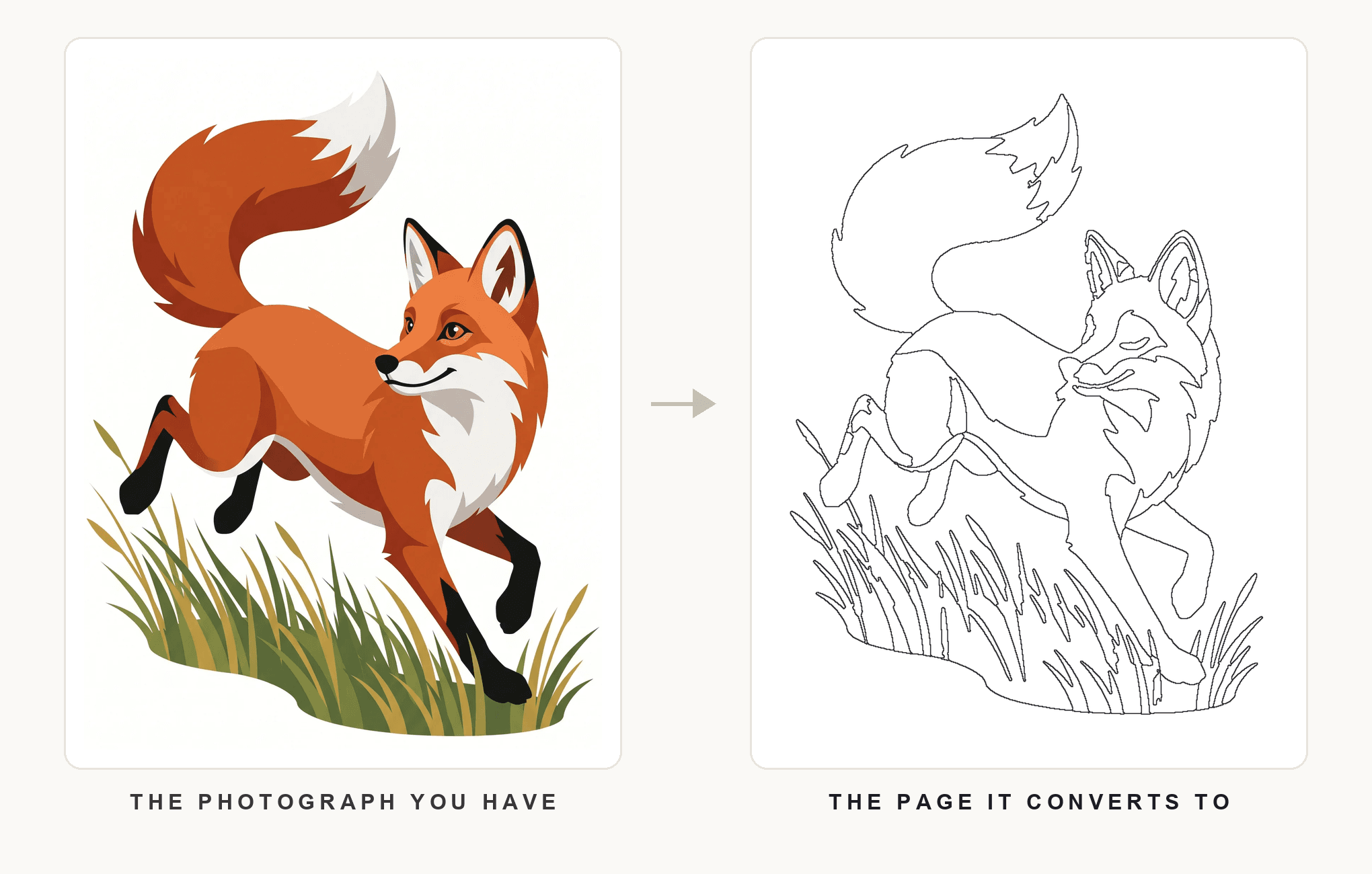
There are two ways tools handle an uploaded photo, and they are not interchangeable. A converter measures the image — grouping similar pixels into regions, discarding the ones too small to colour, and drawing the boundaries. Because the output is derived from your file, the subject's proportions survive and the same input gives the same result. A generator with photo input passes your image through its drawing pipeline, which can return a beautifully styled page but is free to reinterpret what it saw.
For a pet, a portrait, or a family photo where likeness is the point, conversion is the safer route: PBNify, Mimi Panda and Mosaci all work this way, as does the photo-conversion path in the generation-led tools. For a photo you are using as loose inspiration, reinterpretation is a feature rather than a risk, and ColoringBook.ai or iColoring will give you more visual variety.
Either way, the input does most of the work: a cluttered background or flat lighting produces a weak page in every tool on this list, which is why preparing the photo first changes results more than switching products does. Our guides on turning a picture into a coloring page and making custom pages from your own photos cover the practical side.
Best Alternative for AI-Generated Coloring Pages
If the subject only exists as a description — "a fox running through tall grass", "a birthday cake with seven candles" — then conversion has nothing to convert, and you need a generator.
ColoringBook.ai is the closest replacement for ColorBliss here, because it covers the same territory: prompt-based generation, batch runs, character consistency across a book, and editing after the fact. iColoring is the cheaper way in, with a documented but much smaller set of styles. My Coloring Pages sits alongside both with a library big enough that you may not need to generate at all.
The honest caveat is that these tools do not all generate the same way, and none of them generates the way ColorBliss does — style ranges, editing depth and consistency features differ meaningfully. If a specific ColorBliss style is what you are attached to, no alternative reproduces it exactly.
Generation and conversion also solve different problems. Generation gives creative freedom and infinite subjects at the cost of predictability: run it twice, get two different drawings. Conversion gives fidelity and repeatability at the cost of being limited to what you photographed. Our guide to AI photo-to-coloring-page tools covers the conversion side in more depth.
Best Alternative for Color-by-Number Projects
Numbered pages are where the alternatives diverge most sharply from ColorBliss, because color-by-number output is not a documented ColorBliss feature at all. If that is the format you want, you are not really looking for a substitute — you are looking for a different category of tool.
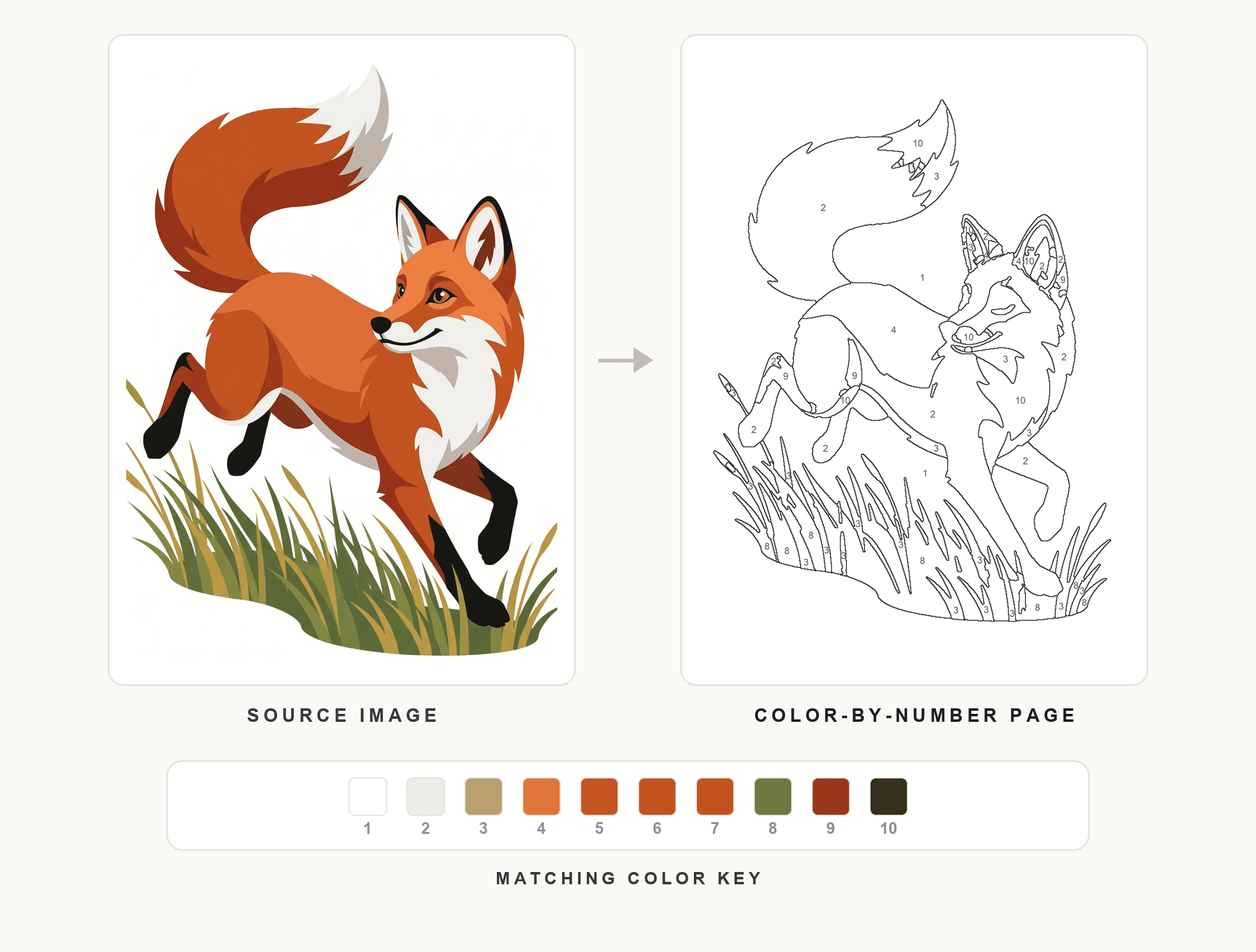
A usable numbered page needs regions large enough to hold a number and a pencil tip, boundaries that follow the subject rather than cutting across it, and a colour key that matches the numbers. Tools differ mostly in how much say you get over the first of those.
PBNify is the quickest free route from a photo to a printable numbered canvas with a colour guide. Mimi Panda gives the most control, letting you merge segments, lock colours and push the palette to a high count. Mosaci sits between them, with colour count and detail settings feeding a print-ready PDF that includes the key.
Palette size is the decision that most affects how the page feels to colour — our guide on how many colours a color-by-number page should have works through the trade-off, and what makes a good photo for conversion explains why some images refuse to reduce cleanly. For background, start with what color by number is and the complete photo-to-color-by-number guide; for a head-to-head of the converters specifically, see our comparison of color-by-number tools.
Best Alternative for Mosaic-Style Coloring Projects
Mosaic colouring is a distinct workflow rather than a visual filter. Instead of following the subject's contours, the page is divided into a uniform grid — hexagons, squares, diamonds, fish scales — and each cell carries a number. The image appears as you fill the cells, which puts the experience closer to cross-stitch than to outline colouring and makes it far more forgiving of shaky hands.
Because the grid is regular, broad tonal shapes carry the picture rather than fine contours, which is why mosaic pages tolerate busy photos that would make a cluttered outline page.
Of the tools here, Mosaci is the one with documented mosaic-cell output, with 8 color mosaic patterns and 2 monochrome mark styles. That is not a claim that it is better overall — it is a narrow capability that most coloring page tools, ColorBliss included, do not document at all. If mosaic is genuinely what you want, the field is small. Our guides cover what mosaic colouring is, how it works, and how to convert a photo into a mosaic page.
Best Alternative for Printable Coloring Projects
Screen quality and print quality are not the same judgement, and a page that looks crisp in a browser can arrive muddy on paper.
Three things decide whether a page prints well: boundary weight that survives being reduced to page size rather than dissolving into grey, regions large enough to hold a number and take a pencil, and enough resolution for the physical size.
Most tools here export both PNG and PDF, but the distinction that matters for book work is whether the export is sized to a page or just to an image — a PDF at a defined trim size drops into a book interior; a PNG has to be placed and scaled by hand. Mosaci exports print-ready PDFs at book page dimensions, ColoringBook.ai documents a KDP builder, and PBNify produces printable numbered canvases as PDF.
Be careful with licensing. Commercial rights differ by product and often by plan tier, and they change — verify the current terms on the product's own site before selling anything, including on ColorBliss itself. Our KDP publishing guide and printable page preparation guide cover the production side.
AI Generator vs Photo Converter: Which Type of Alternative Do You Need?
Almost every choice on this page reduces to one question, and it is worth answering deliberately.
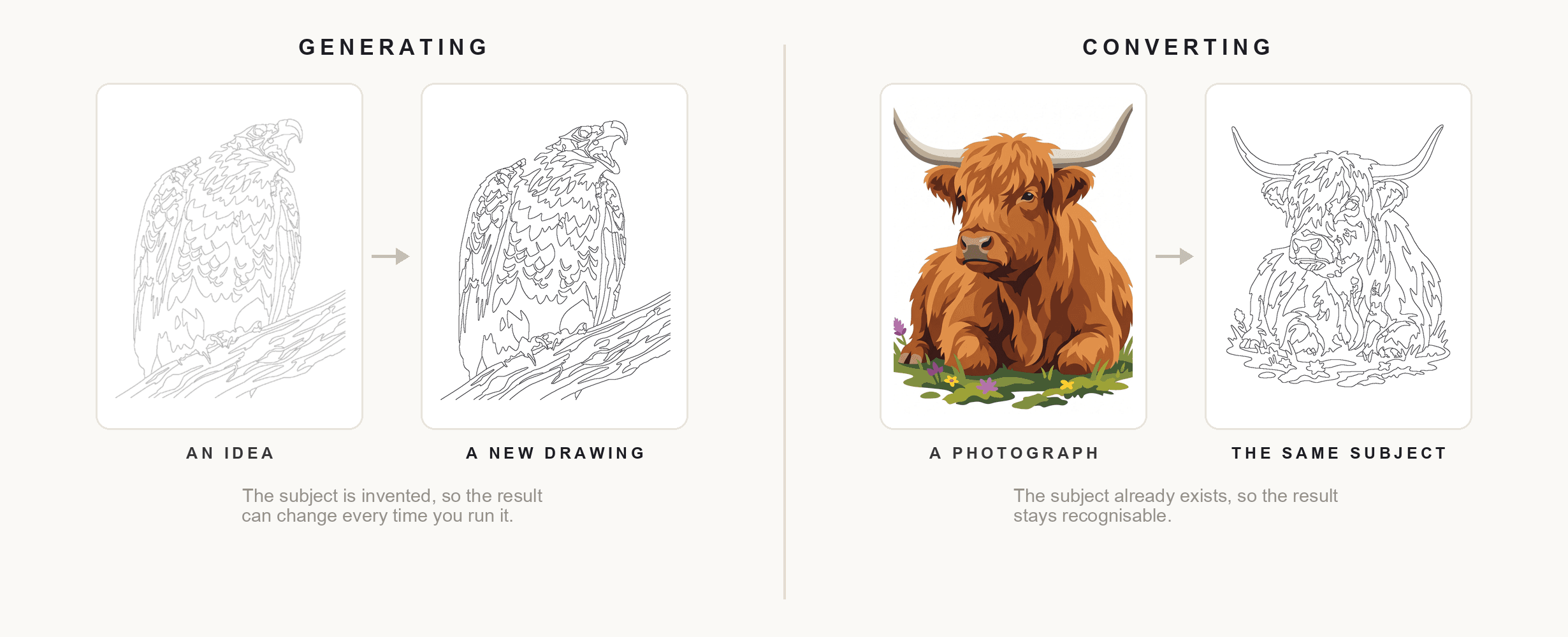
A generator invents the subject. Its strength is creative freedom: any subject, any style, no source material required. Its weakness is predictability — the same prompt produces different drawings, and it cannot render a person or a pet it has never seen. Personalisation, in a generator, means describing something; it does not mean preserving something.
A converter transforms a subject that already exists. Its strength is fidelity and repeatability: the output is measured from your file, the proportions hold, and the same settings give the same page twice. Its weakness is equally plain — no photograph, no page, and no styles to reach for.
The practical test: can you point at the thing you want to colour? If it exists as a photo, use a converter. If it exists only as a sentence, use a generator. If both are true at different moments, using two tools is entirely reasonable — most people making a book do exactly that.
How to Choose the Right ColorBliss Alternative
You want to create a new coloring page from an idea
You need generation. ColoringBook.ai is the closest match to the ColorBliss workflow; iColoring is the low-commitment way to try it; My Coloring Pages is the better fit if children are the audience.
You already have a personal photograph
You need conversion, and the more the likeness matters, the more true that is. Any of the photo-first converters will keep the subject; prepare the photo before you upload, because that step outperforms tool choice.
You want a color-by-number project
Look outside the generator category entirely. PBNify for free and fast, Mimi Panda for detailed control, Mosaci for a print-ready numbered PDF with a colour key.
You want a mosaic-style coloring experience
The field is narrow. Mosaci is the option here with documented mosaic-cell output; check that the grid styles and cell sizes suit your subject before committing to a long project.
You want to build a collection of printable pages
Prioritise consistent output across pages, an export sized for print rather than for screen, and licensing terms you have actually read. Batch processing saves real time once you pass a dozen pages.
Our Scenario-Based Recommendations
No single tool wins across the board, so these are recommendations by project rather than a ranking.
Best for AI-generated coloring pages: ColoringBook.ai, for the closest match to the generate-edit-assemble workflow.
Best for trying the idea at no cost: iColoring, which works without an account.
Best for families and classrooms: My Coloring Pages, for the library as much as the generator.
Best for converting personal photos: any photo-first converter — the choice comes down to whether you want outlines or numbered cells.
Best for structured color-by-number: PBNify if you want it free and immediate, Mimi Panda if you want to adjust every segment.
Best for mosaic-style coloring: Mosaci, as the option here with documented mosaic-cell conversion.
Best for print-oriented projects: Mosaci or ColoringBook.ai, both of which document book-oriented PDF output — verify licensing at your tier first.
Conclusion
The best ColorBliss alternative depends on where your project starts and what you want to hold at the end of it. Someone generating original artwork from a description needs a different product from someone converting a photograph of their dog into a numbered page for a printed book, and a tool that serves one of those well has no particular reason to serve the other.
Work out which you are doing first. If you already have the photograph and want a structured, printable page from it, Mosaci is built for that path, with ten free credits a month to test your own image before you spend anything.
Printable quality checklist
- Decide whether your subject is an idea or a photograph you already own
- Check whether you need an outline, numbered regions, or mosaic cells
- Confirm the tool exports at the size and format your printer or book needs
- Test one of your own images before committing to a subscription or credits
- Print a single page at final size rather than judging it on screen
- Read the current licensing terms at your plan tier before selling anything
Key takeaways
- Alternatives split into two families: generators that invent a subject, and converters that transform a photo you already have.
- ColoringBook.ai is the closest like-for-like replacement for the ColorBliss workflow; iColoring is the free way to test it.
- Color-by-number and mosaic output are not documented ColorBliss features, so those projects need a different category of tool entirely.
- PBNify is free and immediate for numbered pages; Mimi Panda offers the most granular segment and palette editing.
- Mosaci Studio produces numbered mosaic (color-by-number) pages from one upload, with print-ready PDF export and pay-per-use credits.
- Commercial rights differ by product and plan tier — verify current terms on the product's own site before selling anything.
Frequently asked questions
What is the best alternative to ColorBliss?
There is no single answer, because ColorBliss users leave for different reasons. If you want the same generate-edit-assemble workflow from a different product, ColoringBook.ai is the closest match. If you want to try generated pages without paying, iColoring works without an account. If your project starts from a photograph rather than a description, you want a converter instead — PBNify, Mimi Panda or Mosaci Studio, depending on whether you need free output, detailed control, or print-ready structured pages.
Are there alternatives that can turn photos into coloring pages?
Yes, and they work in two different ways. Dedicated converters such as PBNify, Mimi Panda and Mosaci Studio measure your image and reduce it into regions, so the subject's proportions survive and the same settings give the same result twice. Generation-led tools such as ColoringBook.ai and iColoring also accept photo uploads, but pass them through a drawing pipeline that can reinterpret what it saw. For a pet, a portrait or a family photo where likeness matters, conversion is the safer route.
What is the best alternative for color-by-number projects?
Numbered output is not a documented ColorBliss feature, so this means changing category rather than swapping products. PBNify converts a photo into a printable numbered canvas with a matching colour guide, free to design and download. Mimi Panda offers the most adjustment — merging segments, locking colours, editing hex values and pushing the palette to a high count. Mosaci Studio produces a numbered page with a colour key and exports it as a print-ready PDF at book page sizes.
Are AI coloring page generators the same as photo converters?
No, and confusing the two causes most of the disappointment with these tools. A generator invents a subject from a description: unlimited creative range, but it cannot draw a person or a pet it has never seen, and running the same prompt twice gives two different pictures. A converter transforms an image you supply: the subject stays recognisable and the output is repeatable, but you can only make pages from photos you actually have. Many people making a book use both.
Which alternative is best for printable coloring pages?
Look at the export rather than the generator. A PDF sized to a defined page dimension drops straight into a book interior; a PNG has to be placed and scaled by hand. Mosaci Studio exports print-ready PDFs at book page dimensions, ColoringBook.ai documents a KDP builder, and PBNify produces printable numbered canvases as PDF. Whichever you use, print one page at final size before committing to a whole run, and check the licensing terms at your plan tier if the pages are for sale.
Can I use different tools for different coloring book projects?
Yes, and for most people that is the sensible approach. These products are not interchangeable platforms competing on the same axis — they are built around different starting points. Using a generator for invented subjects and a converter for personal photos costs nothing extra in practice, since several of the options here are free or pay-per-use, and it avoids forcing one workflow to do a job it was not designed for.
Related tools
Photo to Coloring Page Converter
Convert an image into a numbered mosaic coloring page and export a print-ready PDF.
Color-by-Number Generator
Turn the same photo into numbered regions with a matching color key.
Mosaic Coloring Page Maker
Rebuild a photo from numbered mosaic cells, with 8 color mosaic patterns and 2 monochrome mark styles.
Written by
Mosaci Studio TeamThe team behind Mosaci Studio
Mosaci Studio is built to help KDP publishers, Etsy sellers, and hobby artists turn photos into print-ready coloring pages without any design experience.
Published Sep 8, 2026 · Updated Oct 6, 2026